Contents
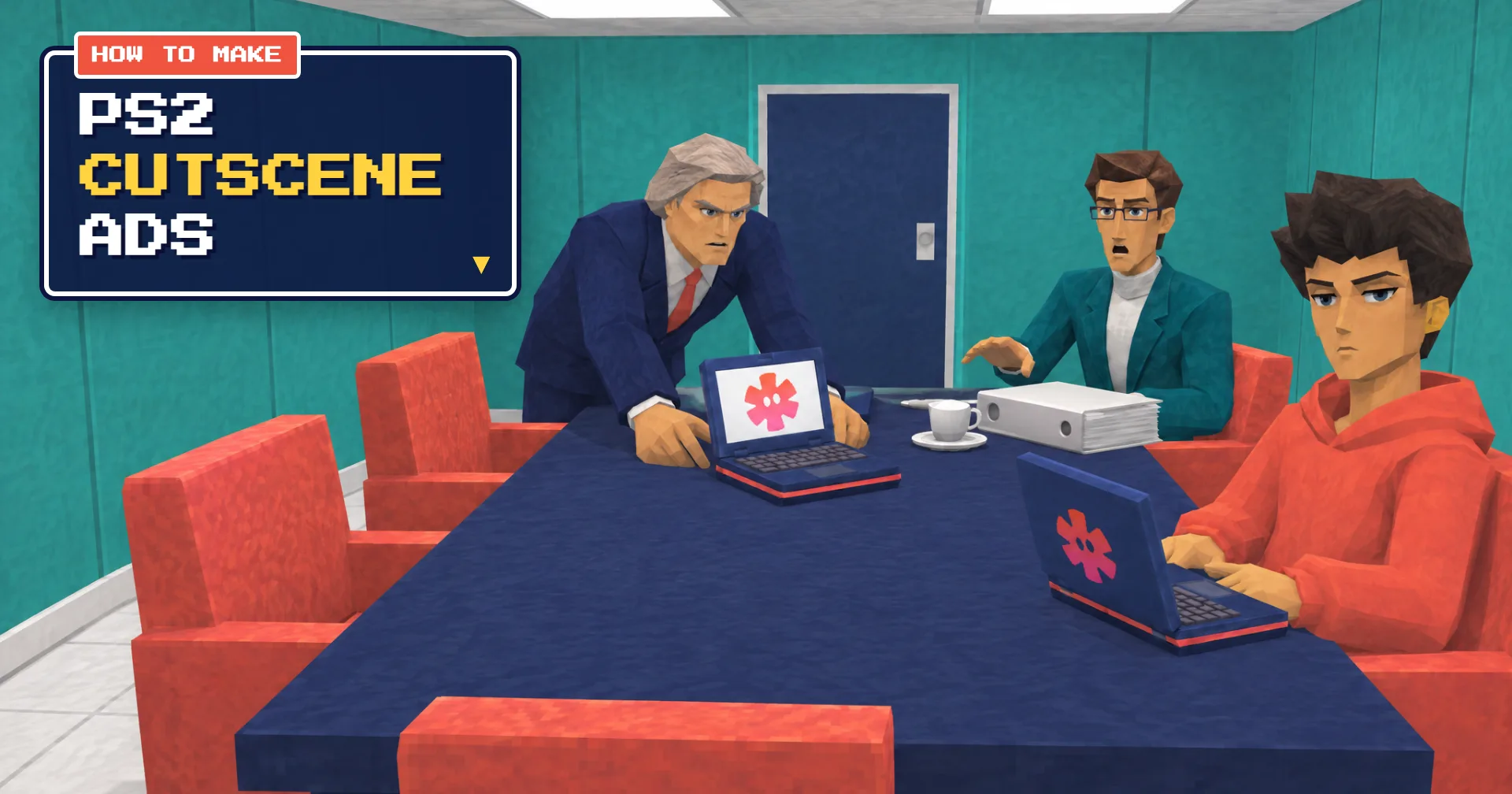
0%A PS2 cutscene ad doesn't look like an ad. It looks like a clip from a mid-2000s console game: stiff low-poly characters, a static camera, a close-up so tight it feels rude. Someone with authority judges the hero, the hero answers in a few flat words, and the room turns in the hero's favor.
This guide walks you through making one in seven stages. The worked example is a real 28-second PS2 cutscene ad for Starpop, made end to end in one Starpop chat. A second chat, for a bottle of wellness drops, supplies the mistakes the first one didn't make. You get the prompts, the timing that makes the joke land, and every take that broke, with the fix.
Never made an AI video before? You don't need to. The guide starts with the tools you need and a short primer on the handful of ideas every stage relies on.
Want the shortcut? The free PS2 Cutscene Skit skill runs this whole process for you, with the style block, the beat sheet, the music bed and the production checks built in. Start it in Starpop in one click, or copy the prompt into Claude, ChatGPT or another AI assistant connected to Starpop.
Make a PS2 Cutscene Skit ad
Create a PS2 cutscene skit ad for my product using the ps2-cutscene-ad skill. If Starpop isn't connected, read https://starpop.ai/docs/integrations/mcp.md and help me connect it first.
The prompt works inChatGPTClaudeGeminiGrokand more

PS2 cutscene skits are blowing up right now
The format took off on Instagram this month through @unemployed_corp, a new clothing brand. Its bio reads "Shipping unemployment worldwide" and "First drop - November '26," and its reels are low-poly cutscenes of deadpan characters who are completely at peace with being unemployed.
Three of those reels went up between November 7 and 13, 2026. By November 17 they had 3.3M, 1.6M and 1.1M views, with 154K, 84K and 65K likes, and the account had 32.1K followers. These are public Instagram counts, not sales data.
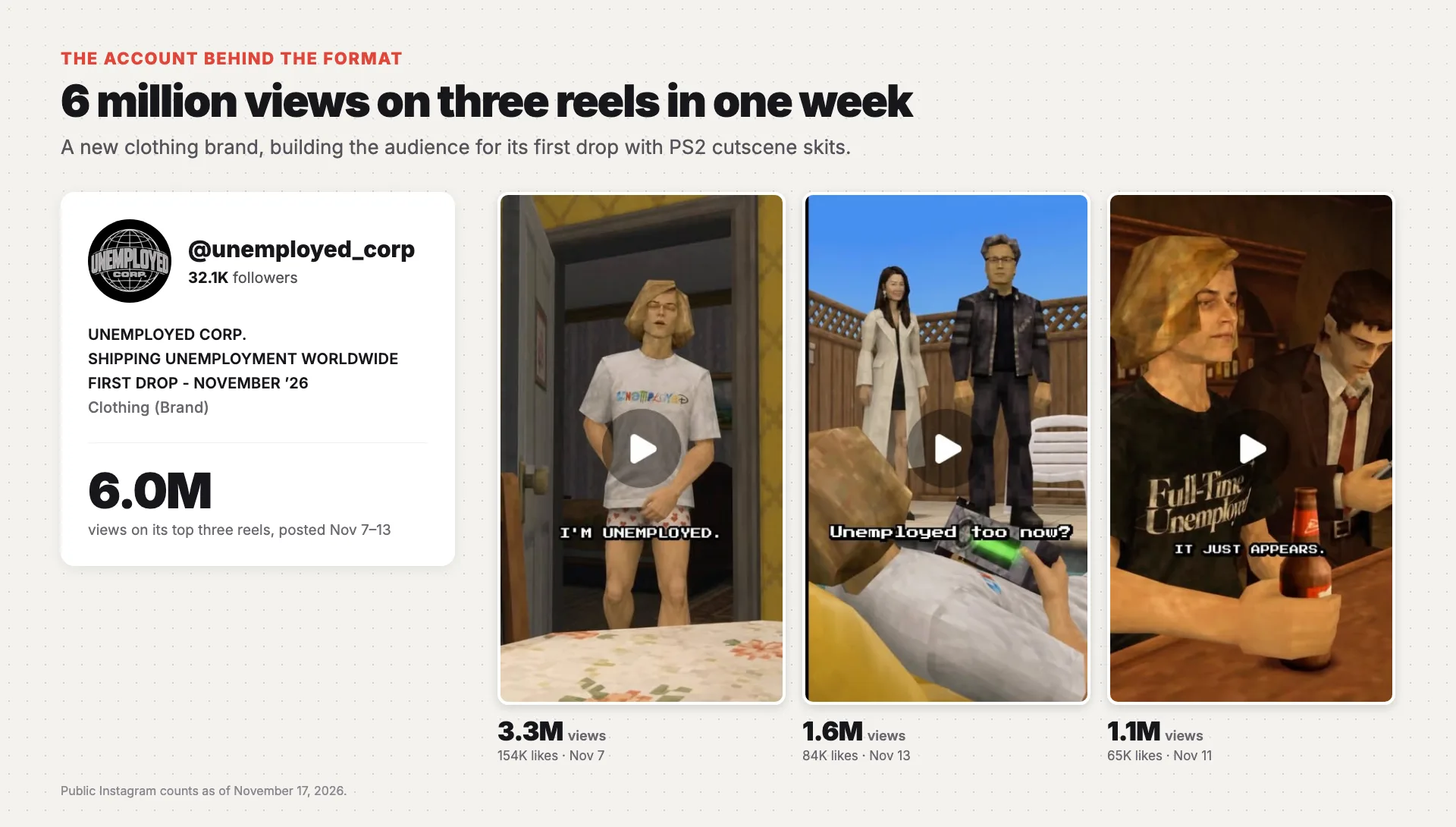
The @unemployed_corp Instagram account: 32.1K followers, and three PS2 cutscene reels with 3.3M, 1.6M and 1.1M views
Read the lines on those covers: "I'm unemployed." "It just appears." "Unemployed too now?" Each one is a flat confession or a reversal, the same beats this guide builds. And most captions end by pointing at the product: "grab ur unemployment in bio," "Drop this week. Whitelist in bio." They're ads for a product launch. They just don't look like ads. Watch the 3.3M-view reel.
The finished ad
Watch it with sound, and listen for where the music cuts out.
A chairman and an agency executive interrogate a young founder about his "creative operation." Three agencies. Twelve people per shoot. Approval meetings with intermissions. When they finally ask about his production team, he says three words: "I just chat." The music drops out, a cup falls into its saucer, and then the chairman stands up and slides over his own laptop. Same logo. He's been doing it too.
The joke works because the viewer has sat in that meeting. They've felt judged for doing something the easy way. For 28 seconds they get to watch someone in that seat win without trying.
The cast, the boardroom, the shots and every voice are generated. Nothing is filmed or voiced by a person.
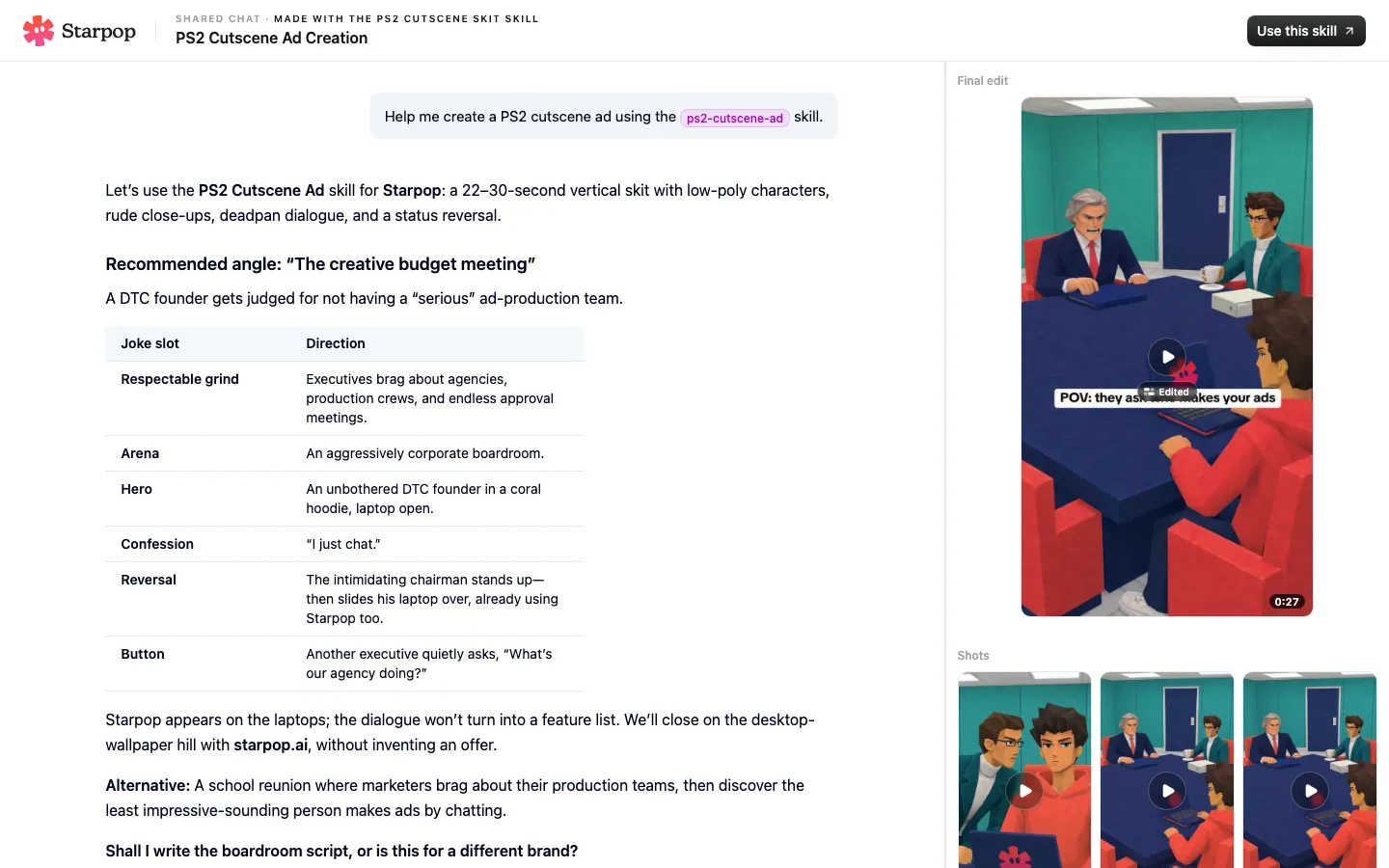
The full chat behind this ad
Open the full chat in Starpop
What you need
You need five kinds of tools, plus a few things about your product. Every tool below is part of Starpop, so you can do the whole process in one chat. If you'd rather put your own setup together, this is what each one has to do.
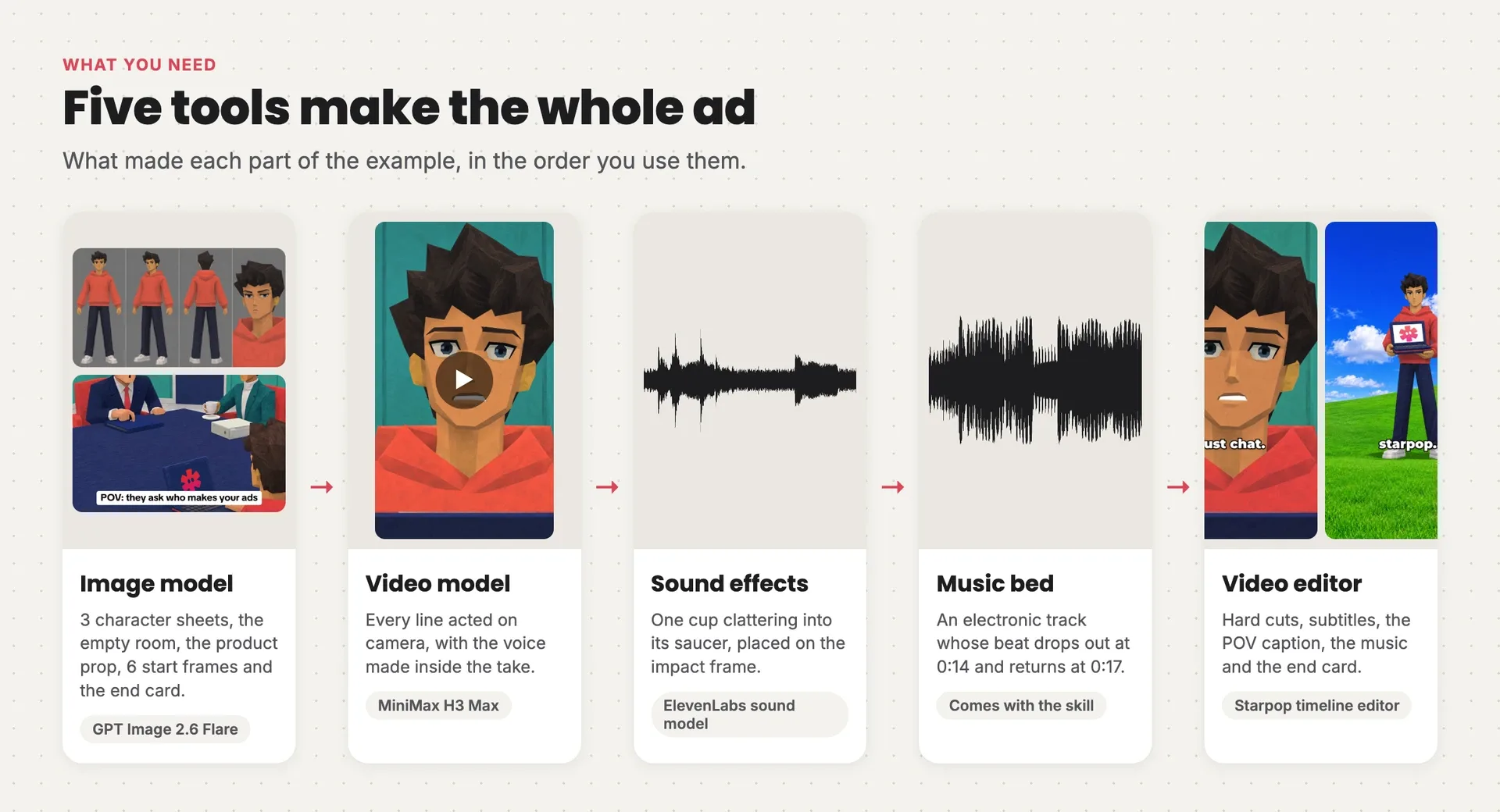
The five tools behind the example ad: an image model made the sheets and frames, a video model acted every line, a sound model made the cup clatter, a music bed set the timing, and an editor assembled the cut
| Tool | What it has to do | Used in the example |
|---|---|---|
| Image model | Take several reference images at once (character sheets, the room, the product) and follow a long, fixed style description word for word | GPT Image 2.6 Flare, for every still |
| Video model | Animate a start frame without moving the camera, and speak the dialogue inside the take, in a distinct voice per character | MiniMax H3 Max |
| Sound effects | Short one-off sounds for each physical gag | Generated with an ElevenLabs sound model; a licensed sound library works too |
| Music bed | An upbeat track with a clear drop-out of about three seconds, a little past the halfway mark | The track that ships with the skill |
| Video editor | A timeline with hard cuts, subtitles, a sound-effects track, a music track and a still end card | Starpop's timeline editor; CapCut or Premiere work too |
From you:
- your product and a clear packshot
- any claims you're allowed to make
- your offer and your URL
- who the ad is for
Starpop has every tool above, keeps your references attached to every generation, and the PS2 Cutscene Skit skill runs all seven stages for you, music bed included.
New to AI video? Read this first
Already made a few AI videos? Skip to the process. Otherwise, these five ideas carry everything that follows.
1. Each model does one job
No single tool makes the ad. An image model turns a text description (a prompt) into a still picture. A video model turns a still into a moving clip, and the newest ones make the characters speak, too. A sound model makes effects, and an editor puts it all in order. You'll pass each piece from one tool to the next, exactly as the diagram above shows.
2. Every generation starts from zero
A model doesn't remember your last image. Describe "the founder" twice and you can get two different people. The fix is a reference image: a picture you attach to the prompt that says "this is who it is" or "this is how it looks." Attach the same references to every generation and the cast stays the same from shot to shot.
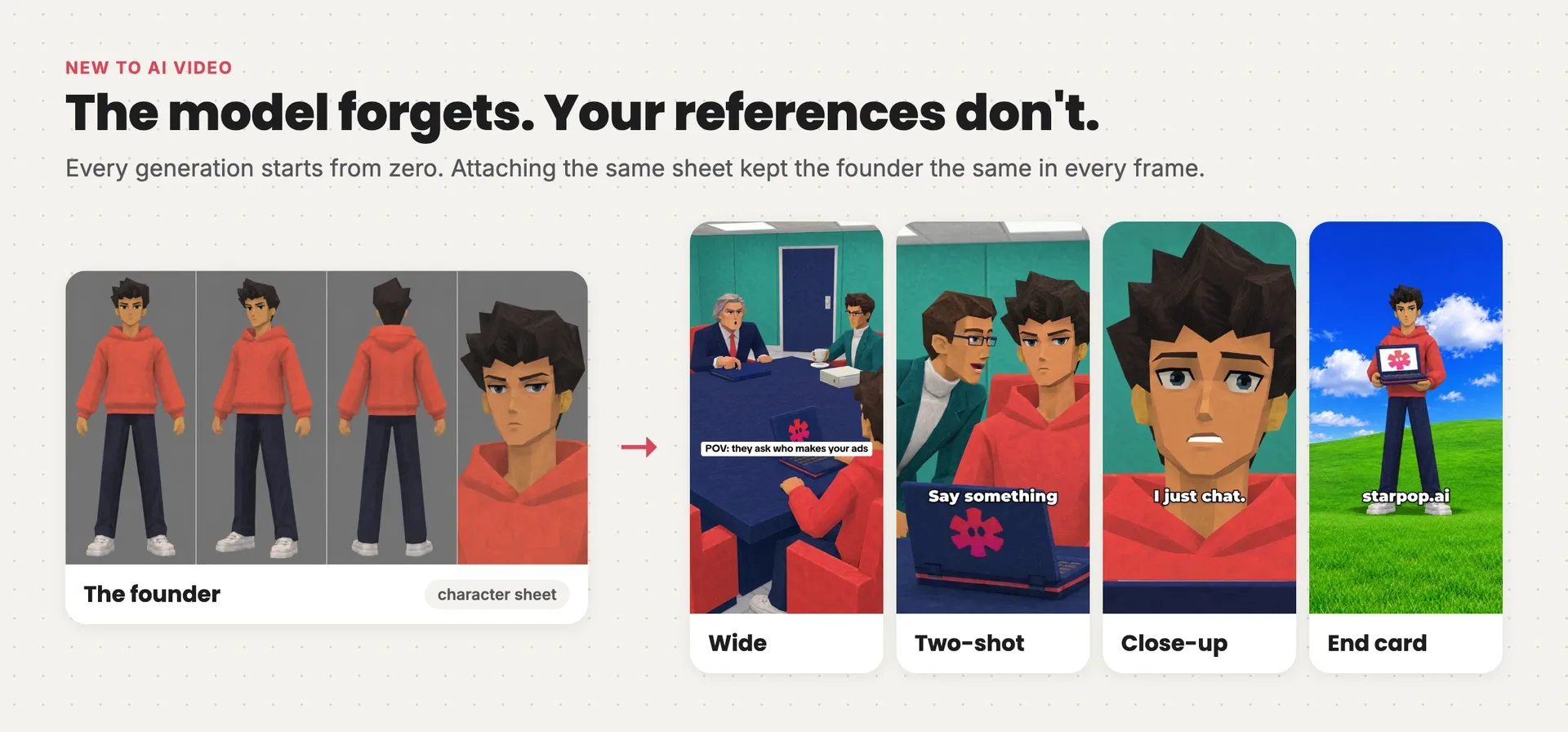
The founder's character sheet on the left, and four frames from the ad on the right where he keeps the same face, hair and hoodie
3. A prompt has parts
Good prompts aren't clever sentences. They're short labeled sections in the same order every time: the style, the shot, the exact script, and what to leave out. Image prompts swap the script for composition and lighting. Every prompt in this guide follows that pattern.
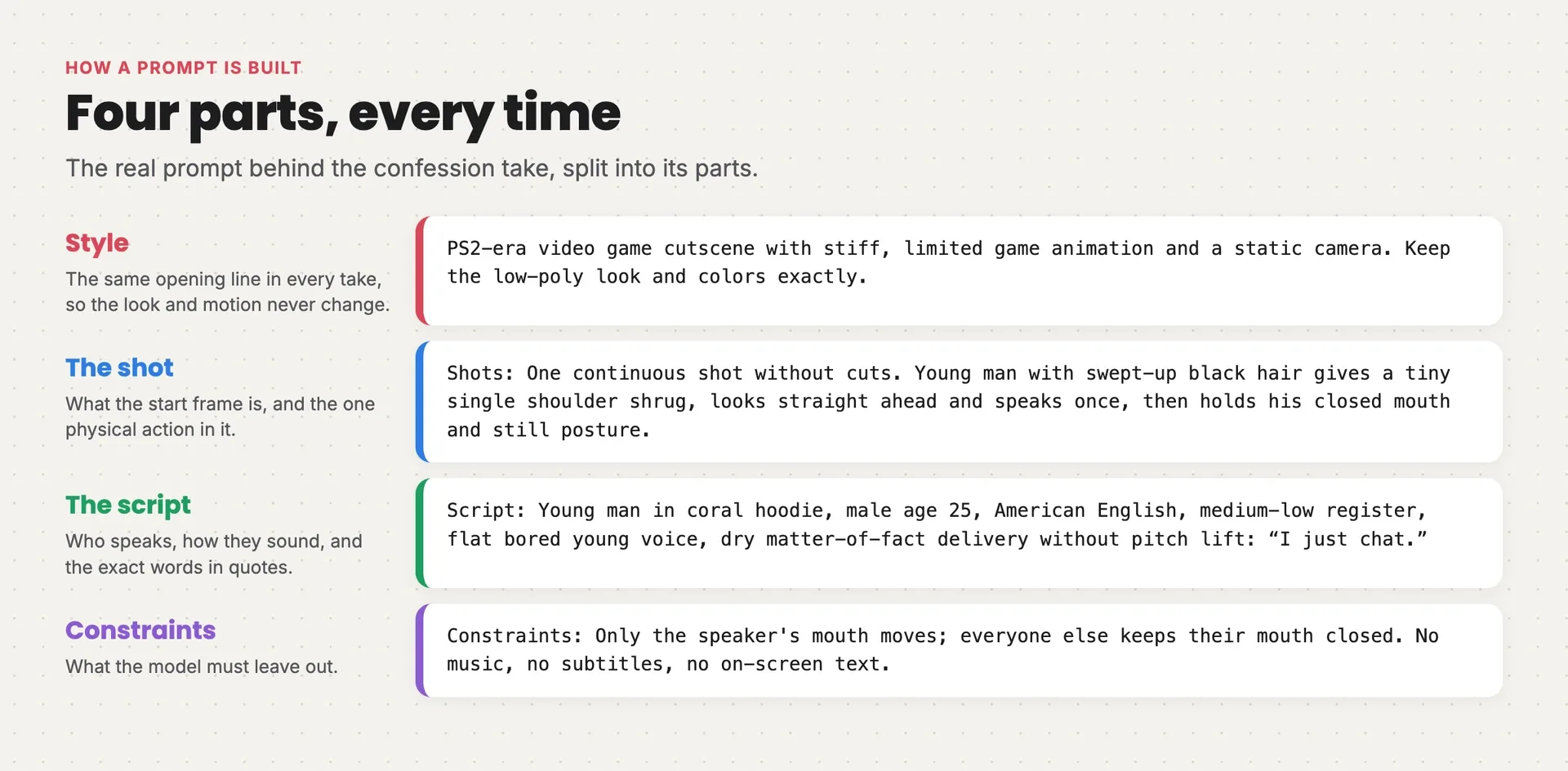
The real video prompt for the confession take split into four colored parts: style, the shot, the script, and constraints
4. A start frame becomes a clip
Video models work best when you hand them the picture to start from. You make a start frame for each camera position with the image model, then give the video model that frame and a prompt describing the action and the dialogue. In this format, the voice is made inside the same generation, so the mouth and the words match.
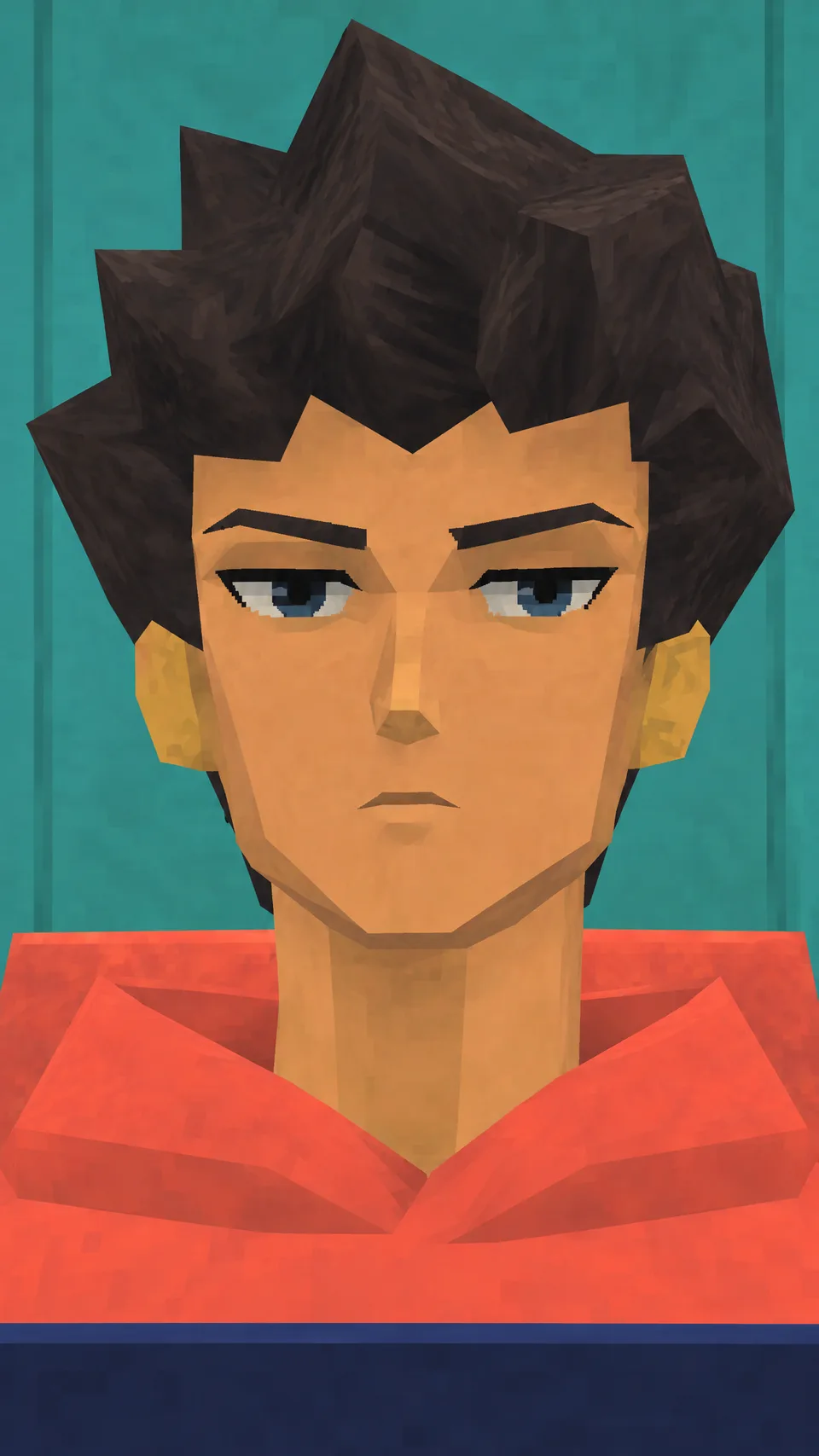 Start frame: the founder in an extreme close-upStart frame: the founder in an extreme close-up
Want to go deeper? Omni-reference vs start and end frames explains the ways to guide a video model, and how to storyboard an AI ad covers planning shots before you generate them.
5. Results vary, so fix things early
Run the same prompt twice and you get two different results, so plan for retries. Each step also costs more per try than the one before it: words are free to rewrite, a new picture is cheap, and a new video take is the most expensive try of all. That's why this guide keeps telling you to settle things before moving on.
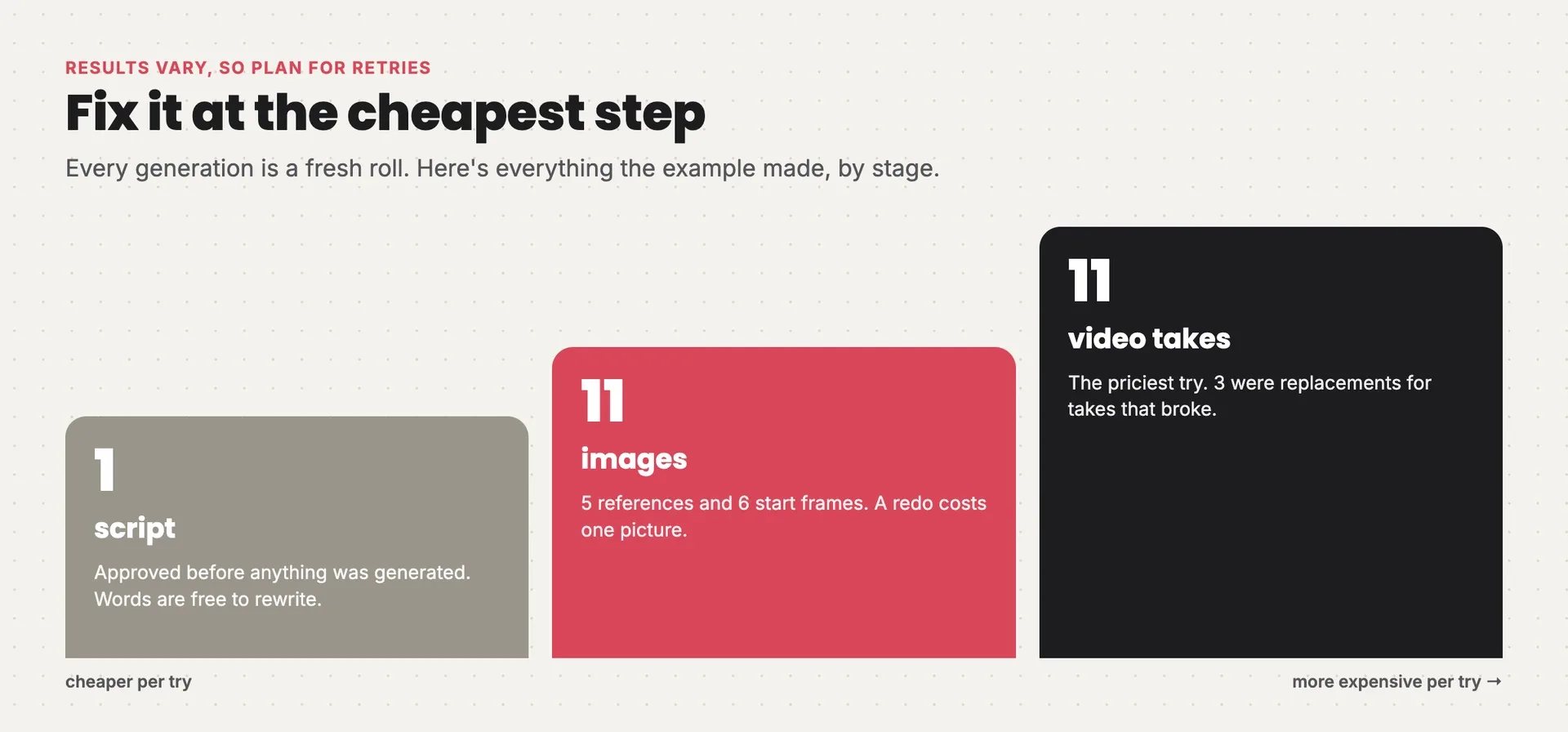
Everything the example made: 1 script, 11 images and 11 video takes, with each step costing more per try
The words you'll see
| Term | What it means |
|---|---|
| Reference image | A picture attached to a prompt to fix who, where or how something looks |
| Character sheet | One clean image of a character from several angles, used as their reference |
| Style block | A fixed paragraph describing the look, pasted word for word at the end of every image prompt |
| Start frame | The still a video generation starts from |
| Setup | One static camera position. Several shots can share one setup |
| Take | One video generation of a setup, with its lines spoken in it |
| Lip sync | Mouths moving in time with the spoken words |
| Pilot | A first, small batch of takes that proves the look and voices before you make the rest |
| Drop-out | The few seconds where the music's beat cuts out |
| 9:16 | Vertical video, the shape of a phone screen |
The process at a glance
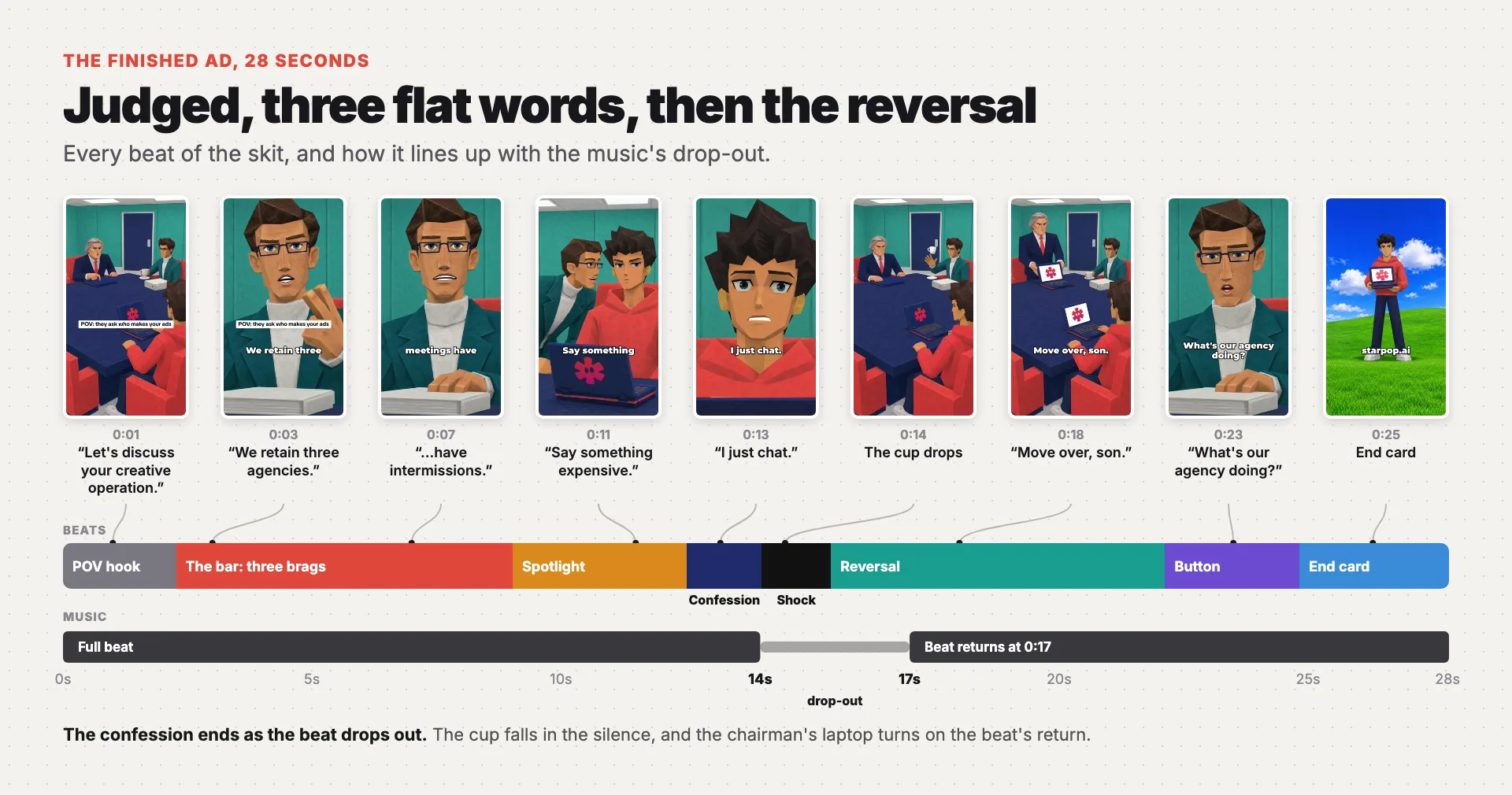
The finished ad on one timeline: the brags, the confession, the shock beat in the music's drop-out, and the reversal on the beat's return
- Set the angle. Fill six slots that turn the product into the joke, and pick the arena where the hero gets judged.
- Write the script. Time every beat to the music, with the confession ending as the beat drops out.
- Build the cast and the set. One character sheet per character, one empty room, and the product as a game prop.
- Frame every setup. One start frame per static camera position.
- Pilot the longest exchange. Prove the voices and the look on two takes before paying for the rest.
- Generate the remaining takes. Direct physical actions, and fix only verified defects.
- Edit, render and check. Subtitles, sound effects, the music in one piece, and the hill end card.
If you remember only two rules, remember these:
- The hero never explains. The confession is the product in its least impressive-sounding form, said flat. The moment the hero justifies it, the joke is gone.
- The music sets the clock. The beat drops out at 0:14 and comes back at 0:17. The confession lands right before the drop, the shock plays in the silence and the reversal arrives with the beat.
Stage 1: Set the angle
Goal: one sentence that turns your product into a joke, before you write any dialogue.
The format runs on one comedic engine: someone measures the hero against conventional success, and the hero wins by doing the unimpressive thing. Your job in this stage is to find that unimpressive thing in your product. Fill these six slots before you write a line:
| Slot | The question |
|---|---|
| Respectable grind | What do people brag about doing the hard or expensive way, that your product makes unnecessary? |
| Arena | Where would someone be judged on that grind? |
| Hero | Who is your customer at their most unbothered? |
| Confession | Your product's truth in 1–4 flat words, in its least impressive form |
| Reversal | Visible proof the hero is winning, or the authority turns out to be one of them |
| Button | A side character's last line that exposes the authority or concedes |
Here's how the two example chats filled them:
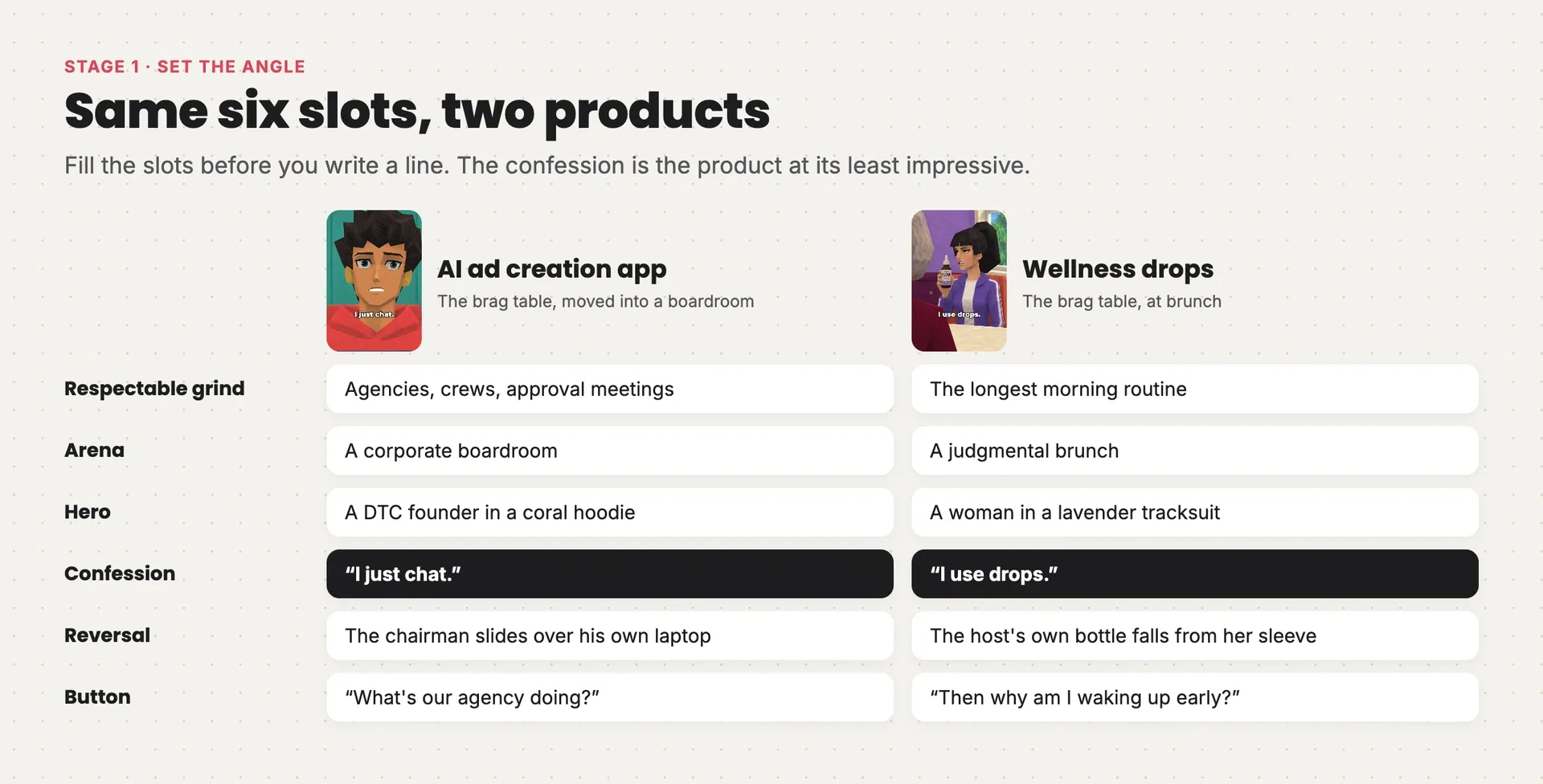
The six slots filled for two products: an AI ad app in a boardroom with the confession “I just chat”, and wellness drops at a brunch with the confession “I use drops”
The confession is the slot that makes or breaks the ad. "I just chat" is how Starpop works, and it's also the least impressive answer you could give a boardroom. Look for the version of your product's truth that sounds lazy: "I use drops," "it's one scoop," "my phone does it."
Then pick the arena that fits your product:
| Arena | Shape | Fits |
|---|---|---|
| Meet the parents | Interrogation, an ally whispers advice to lie, the confession, the authority stands up, he's secretly one of them | Identity and lifestyle brands |
| The brag table | Peers brag in threes, "And yours?", the confession, proof, a secret member | Products that replace an expensive routine |
| Reverse interview | An institution pitches perks, the hero rebuts each with what the product already gives, walks out | Products that replace a service, tool or employer |
| Split-screen day | Hero and foil on matching timestamps, they meet, "How?", a deadpan answer | A visible daily contrast |
Both examples are the brag table: one moved into a boardroom, one at a brunch. You can invent a new arena anywhere your audience gets judged: a school reunion, a performance review, a landlord viewing, a first date.
Before you move on, check:
- the confession is four words or fewer, and true
- a stranger would understand the grind without an explanation
- the reversal is something a camera can see, not a feeling
Stage 2: Write the script
Goal: a complete, timed script you'd approve line by line, before any picture exists.
The beat sheet is fixed by the music, so you write to a clock:
| Beat | Time | Job |
|---|---|---|
| POV hook | 0–2 s | A caption names a moment where the viewer gets judged. Open mid-scene with the antagonist already talking |
| The bar | 2–8 s | The antagonists set conventional success in up to three escalating brags |
| Spotlight | 8–11 s | A direct question turns on the hero. Optionally an ally whispers advice |
| Confession | 11–14 s | The hero's flat words on a rude close-up, ending as the beat drops out |
| Shock | 14–16 s | No dialogue. One physical gag shows the room breaking |
| Reversal | 16–22 s | Often a fake-out first, then the proof, on the beat's return |
| Button | 22–26 s | The last line, never the hero's |
| End card | Last 2–3 s | The hero and the product on the hill, the URL, one true offer |
The final script:
POV CAPTION: they ask who makes your ads

CHAIRMAN:   Let's discuss your creative operation.
EXECUTIVE:  We retain three agencies.
CHAIRMAN:   Every shoot needs twelve people.
EXECUTIVE:  Our approval meetings have intermissions. Mandatory.
CHAIRMAN:   And your production team, son?
EXECUTIVE:  (leaning in) Say something expensive.
FOUNDER:    I just chat.
            (Music drops out. The executive's cup falls into its saucer.)
CHAIRMAN:   (stands, slides his laptop over) Move over, son.
FOUNDER:    You chat too?
CHAIRMAN:   Minutes are confidential.
EXECUTIVE:  What's our agency doing?

END CARD:   starpop.ai
Every line has to make sense on its own
The Starpop script was approved on the first try. The brunch script took three drafts, and each fix started with the person making the ad reading a line and not getting it.
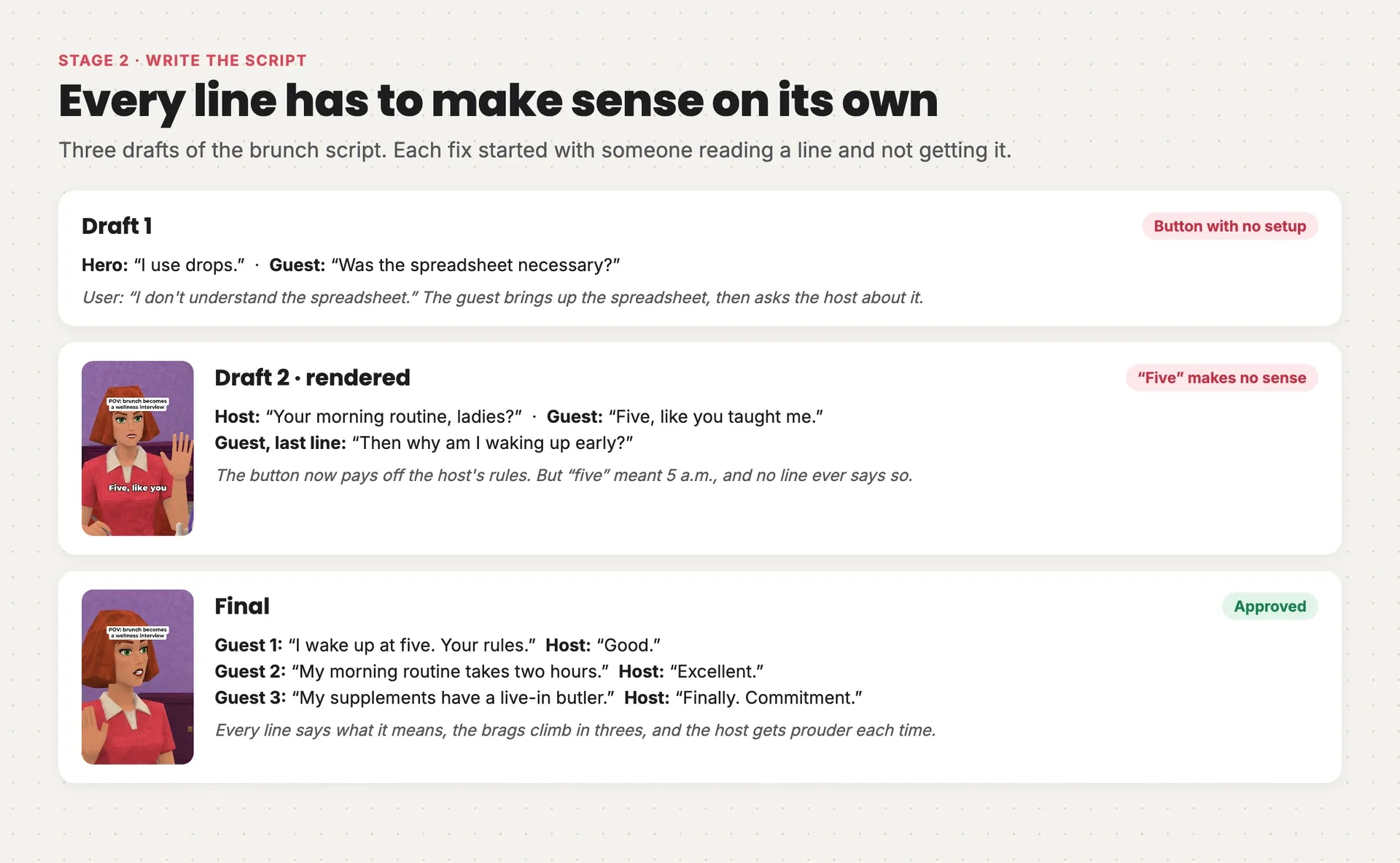
Three drafts of the brunch script: a button about a spreadsheet nobody set up, then a guest who answers just “Five”, then the final with three escalating brags and a prouder host after each
The first draft ended on "Was the spreadsheet necessary?" The spreadsheet was meant to show someone running her wellness routine like a corporate project, but nothing in the scene set it up. The reply was simply "I don't understand the spreadsheet." The fix was to make the host the source of the strict routine, so the button pays off something the viewer has seen: "Then why am I waking up early?"
The second draft made it to a finished render, and still had a gap. Asked about her morning routine, a guest answered "Five, like you taught me." She meant waking up at 5 a.m., but no line ever said so. The final version says it outright: "I wake up at five. Your rules." It also took the request to make the guests "more and more absurd" and the host "more and more proud": three brags that climb, and three approvals that climb with them.
The lesson: you know what every line means, but your viewer only has the words. Read your script as a stranger, and cut anything that needs explaining.
Run your own script against these rules:
- Lines are 2–8 words; the hero's are 1–5. Every line answers the one before it.
- The hero never explains, raises their voice or uses an exclamation mark. "You chat too?" is the most excited he gets.
- Brags come in threes, and the third is the most absurd. Agencies, then twelve people, then meetings with intermissions.
- Antagonists speak in status clichés with a smug qualifier. "Mandatory." "Son." Formal address raises the stakes.
- Every gag is a physical event a game character can perform. A cup dropping, a chair scraping, a laptop sliding. Not a facial expression.
- No benefits, prices or calls to action inside the film. The product is spoken at most once, usually never. The props and the end card carry the brand, and any offer lives on the end card.
Stage 3: Build the cast and the set
Goal: every character, the room and the product locked in the format's look, before you frame a single shot.
The look is the format, so lock it first. Every still in the example, from the character sheets to the end card, was made with GPT Image 2.6 Flare, and every prompt ends with the same style block, word for word:
STYLE: a cutscene frame from a mid-2000s console game (PlayStation 2 / original Xbox era), captured from an emulator at high internal resolution so the image is crisp while every 3D asset is low-poly. Characters are clearly video-game 3D models, never real people: low-polygon meshes with visibly faceted silhouettes, angular jawlines, flat-planed cheeks and nose, simple blocky hands, stiff mannequin posture. Faces use hand-painted low-resolution game textures (not photographs), slightly smeared, with glassy painted eyes and simplified features. Hair is one solid sculpted mesh with a low-res painted hair texture and hard chunky planes, no individual strands. Clothing is flat-textured with baked-in folds; logos and printed graphics are slightly pixelated. The set is a simple game level: repeating low-res textures, box-like furniture, low-poly props. Fake ambient occlusion in corners, faint blob shadows, no realistic specular highlights, no depth of field. Static cutscene camera. No UI, no HUD, no captions, no subtitles, no watermark, no readable text or signs anywhere. COLOR AND LIGHT: high-saturation, high-key palette built from the set palette named in the scene; those bold colors appear on walls, furniture, clothing and props; clean neutral white light; whites stay white and skin tones stay natural; no sepia, no yellow cast, no brown haze.
Two details in that block do most of the work:
- "Captured from an emulator at high internal resolution." This asks for two things at once: a crisp, clean picture, and meshes that stay visibly low-poly. Low-poly doesn't have to mean blurry.
- No colors in the style block. The palette goes in each scene instead: "Set palette: teal walls, coral chairs, navy tabletop, white floor and trim." Any example color you put in the style block gets copied into every scene you make.
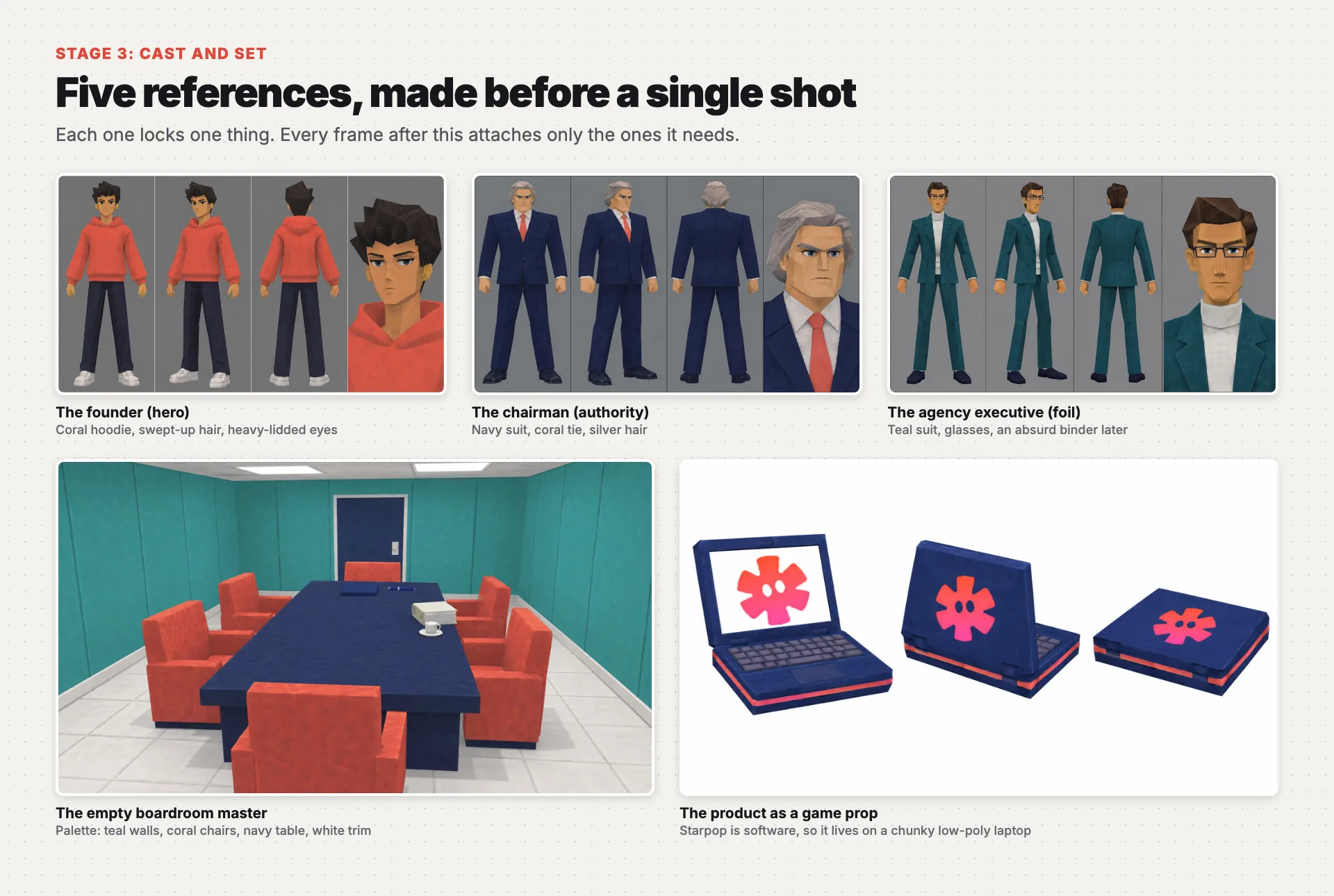
The five references: three character sheets on gray, the empty teal-and-coral boardroom, and the Starpop laptop as a low-poly game prop
Then make five references, each with one job:
- One character sheet per character. Four panels on flat gray: front, three-quarter and back in a stiff A-pose, plus a face close-up. Design one hero per brand and give them a silhouette that reads at phone size. Here that's the founder's swept-up hair and oversized coral hoodie.
- One empty room master. No people, with its palette named. Every angle of that room comes from this one image.
- The product as a game prop. Attach your real packshot and ask for its shape, colors and logo "rendered as a slightly pixelated game texture." Starpop is software, so it became a chunky early-2000s laptop with the logo on the lid.
A style reference image goes into each sheet and the room, labeled as style only, so the model copies its rendering and never its characters or room. Here's the founder's sheet prompt from the example, before the style block:
References: Image 1 is a style reference only: match rendering, never its characters, room, furniture, colors, or composition.
Visual: One original male DTC founder, age 25, medium warm skin, long angular face with heavy-lidded dark eyes, chunky swept-up black hair mesh, slim average-height body, oversized plain coral hoodie, navy straight trousers, white low-poly sneakers, no accessories or logos. Recognizable swept-up hair and oversized hoodie silhouette. Neutral closed mouth. One identical character in four panels side by side: front full body, three-quarter full body, back full body, head-and-shoulders face close-up. Stiff A-pose in body views. Flat medium gray background, thin dividing lines, no labels. All full-body views same scale and baseline. Palette: coral hoodie, navy trousers, white shoes, medium gray background.
Composition: Landscape reference sheet, orthographic body views, no perspective distortion, sufficient margins around shoes and hair.
Lighting: Even neutral white studio lighting.
Constraints: Exactly one character identity repeated in four panels, no props, no environment, no readable text.
Stage 4: Frame every setup
Goal: one approved start frame for every camera position in the script.
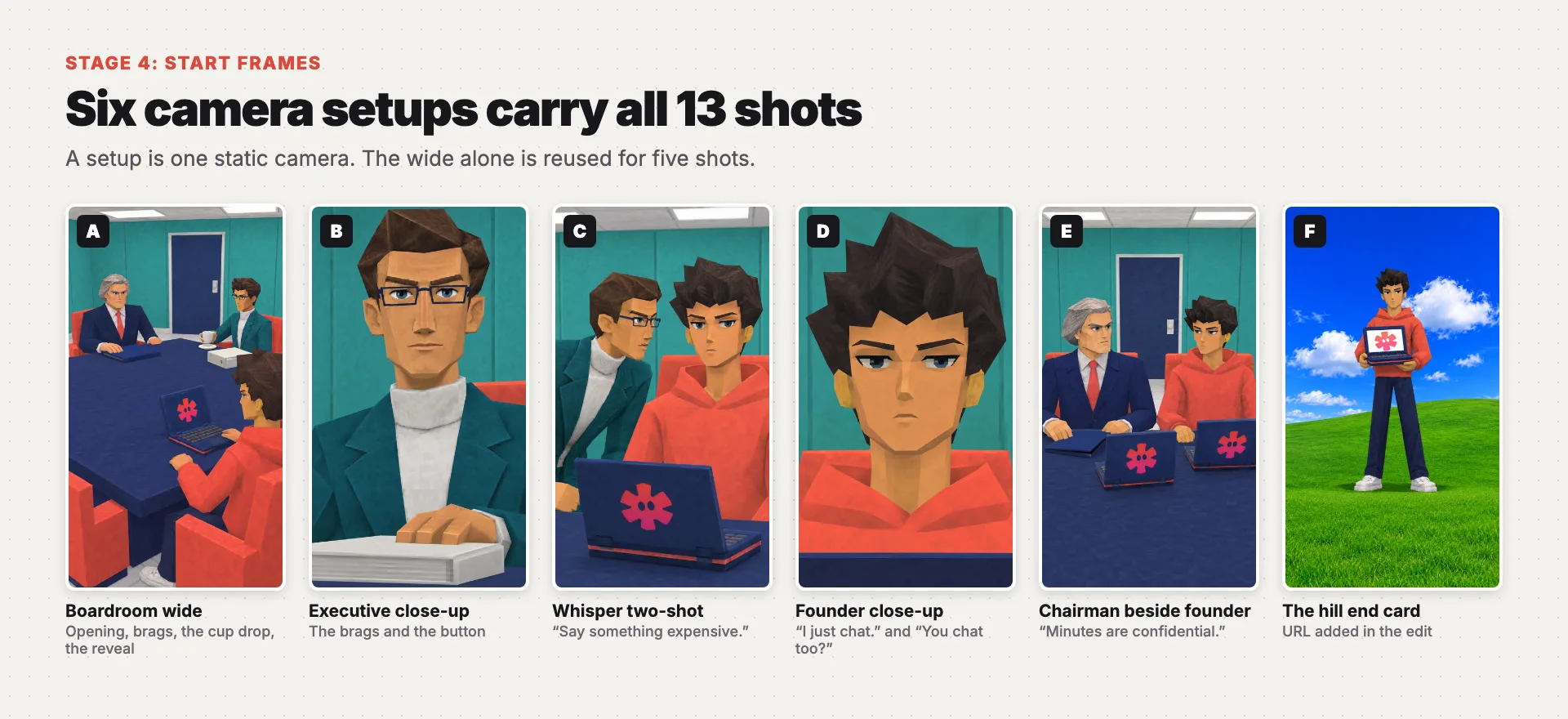
The six start frames: the boardroom wide, the executive close-up, the whisper two-shot, the founder close-up, the chairman beside the founder and the hill end card
A cutscene camera never moves, so you don't need a frame per shot. You need a frame per setup. The example has 13 shots and six setups. The boardroom wide alone carries five of them: the opening, two of the chairman's lines, the cup drop and the reveal.
One rule decides your setups: every line must be spoken by a character visible in its setup. If a line comes from off-screen, the video model lip-syncs it onto whoever is in frame. That's why the executive's whisper needs its own two-shot instead of playing over the founder's close-up.
The close-ups are where the format gets its comedy, so push them. Here is the frame prompt for the confession:
References:
Image 1 is the founder: identity, outfit and proportions only.
Image 2 is the canonical boardroom environment and geography.
Image 3 is the canonical Starpop laptop prop.
Visual: Founder seated at the south head of the boardroom table, alone in frame. Heavy-lidded eyes looking straight ahead toward chairman north of him, mouth closed, shoulders loose and level. The camera is directly north of founder looking south. His swept-up black hair, faceted cheeks and angular nose remain exactly the canonical model. Coral hoodie collar at bottom, a narrow dark laptop screen-top edge along extreme bottom foreground without obstructing chin. Behind him plain teal south wall and thin coral chair strip. Set palette: teal walls, coral hoodie and chair, navy laptop edge, white trim.
Composition: Single vertical 9:16 intrusive extreme close-up, camera slightly below chin, face fills nearly entire frame width, forehead and sculpted hair remain visible, eyes upper-middle, whole mouth visible. Static cutscene camera, no lens blur. Neutral physical pose allows tiny shrug or downward glance later.
Lighting: Neutral white ceiling light, clean skin colors.
Constraints: Only founder visible; no other people or objects except tiny laptop edge. No text, UI, captions or subtitles. No reference-sheet panels, no modern smooth face.
Notice what the prompt plans ahead for. The pose is neutral, so the take can add a shrug. It says "whole mouth visible," because a mouth the model can't see is a mouth it can't lip-sync. And it says where the chairman sits, so the founder's eyes have someone to look at.
Give the eyes a target
That last point is easy to miss in a wide shot. In the brunch ad's first cut, the hero sits in the foreground with the host across the table, and her eyes go to the lens instead. The person making the ad called it out: "it's a bit weird how the hero is looking directly at the camera."
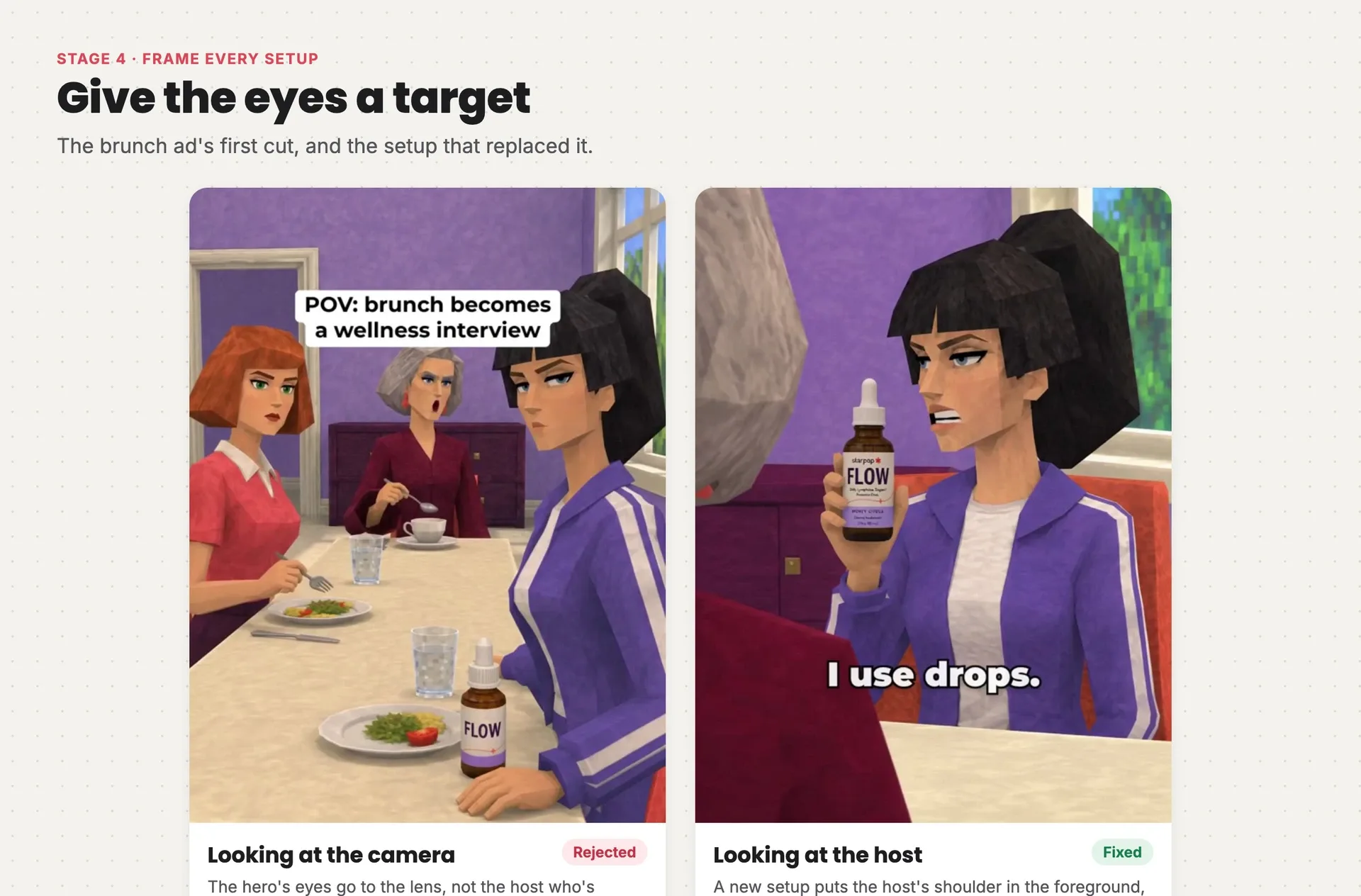
Left: in the brunch ad's first cut, the hero in the foreground looks toward the camera. Right: a new setup with the host's shoulder in the foreground, and the hero speaking to her
The fix wasn't a sterner prompt on the same frame. It was a new setup: the host's shoulder in the foreground, the hero turned toward it. When a character speaks to someone, put that someone in the frame, even if it's only a shoulder. The model can't aim a gaze at a person it can't see.
Check every frame before you animate it. Reroll any frame with a sepia or yellow cast, a smooth modern face, extra people, readable text or a gaze aimed at nobody. Fixing a frame costs one image; fixing it after animation costs a video.
Stage 5: Pilot the longest exchange
Goal: proof that the look, the voices and the timing work, from two takes, before you pay for the rest.
Every line in this format is acted on camera, with the voice generated inside the take. There is no voiceover track. The example uses MiniMax H3 Max, animating each take from its approved start frame.
The pilot is the longest two-person exchange plus the hero's confession. Two takes tell you whether the look holds through motion, whether each line comes from the right mouth, and whether the hero sounds like the same person twice. Here's the confession take prompt from the example:
PS2-era video game cutscene with stiff, limited game animation and a static camera. Keep the low-poly look and colors exactly.
References: The supplied start frame is the approved founder confession close-up; preserve identity, coral hoodie, navy laptop edge and teal boardroom.
Shots: One continuous shot without cuts. Young man with swept-up black hair gives a tiny single shoulder shrug, looks straight ahead and speaks once, then holds his closed mouth and still posture. Preserve all faceted face geometry. Set palette: teal, coral, navy and white.
Camera: Completely locked extreme low-angle close-up as supplied, no zoom or camera motion.
Script: Young man in coral hoodie, male age 25, American English, medium-low register, flat bored young voice, dry matter-of-fact delivery without pitch lift: "I just chat."
Voice & delivery: Say the exact three words in one continuous short utterance starting around 0.5 seconds, finishing by 1.6 seconds. No hesitation between words, no additional lines. Hold silently afterward with mouth closed. Quiet room only.
Constraints: Only the speaker's mouth moves; everyone else keeps their mouth closed. No music, no subtitles, no on-screen text.
Three parts of it carry over to every take:
- The opening line is the same in every prompt. "Stiff, limited game animation" asks for motion that matches the low-poly look, not fluid modern animation.
- The hero's voice is described identically everywhere it appears. "Flat bored young voice, dry matter-of-fact delivery without pitch lift" is copied word for word into every founder line.
- "Only the speaker's mouth moves." Every take ends with it, so each line has one clear speaker and the listeners keep their mouths shut.
The voice that changed between takes
The second rule is there because the model doesn't remember earlier takes. The brunch pilot proved it: the hero's first line in the wide shot and her confession in the close-up came out in two different voices. The pilot caught it before any other take was made. The confession was regenerated with the hero described as a young British woman, matching her wide-shot reply, and her later lines were regenerated to match that same voice.
Listen to all three. This is exactly what a pilot is for: one cheap comparison that catches a problem before it's copied into ten takes.
Stiff, slightly synthetic voices are correct for this format. Don't reroll a take because it sounds like a video game. That's the point.
Stage 6: Generate the remaining takes
Goal: every setup animated to the pilot's standard, with every line verbatim and from the right mouth.
Keep each take to its setup's lines at the shortest duration that fits, and trim in the edit. Restate the wardrobe, the product and who holds what in every take. The example needed 11 video generations for 13 shots, and three of them were replacements. All three failures had the same cause: the prompt described an intention instead of a physical event.
The silent whisper
The script says the executive whispers "Say something expensive." The model took that literally: the first take is nearly silent, with lips that barely move. Asking for a whisper gets you a mime. Ask for low, audible speech instead:
First take:   ...smug corporate cadence, now a quick urgent whisper: "Say something expensive."

Fixed take:   ...smug corporate cadence, soft but clearly audible conspiratorial speech: "Say something expensive."
              The spoken audio must be audible, not silent acting.
The lean toward the founder's ear sells the whisper. The voice only has to be quieter.
The cup that was set down
The shock beat needs the room to break, and "the cup slips from his hand" produced a man carefully putting his cup down. The fix spells out the physics and says what it is not:
First take:   At around 0.5 seconds the white cup slips from the glasses-wearing executive's right hand and drops a short distance into the white saucer directly below on the table.

Fixed take:   Immediately the executive's fingers open completely and RELEASE the white cup. Cup visibly FALLS freely 15 centimeters straight down into the saucer by 0.7 seconds. This is an accidental DROP, not carefully putting a cup down. His empty open hand remains frozen in the air above cup.
The fixed take is also generated completely silent, with the clatter added as a sound effect in the edit. That puts the sound exactly on the impact frame and keeps the music's drop-out clean.
The chair that vanished
When the chairman stands for the reveal, his chair disappears in the first take. Video models lose track of things that leave the action, so tell them what must still exist, and give every action its own time:
Fixed take: From 0–0.8 seconds chairman stands straight up slowly; his coral chair remains physically behind him, unchanged and visible for the entire clip, never disappears. From 0.8–1.5 seconds he slides navy folder aside and raises his laptop screen, revealing the same coral emblem on white. At 1.5 seconds he turns screen toward founder and gently pushes laptop 10 centimeters toward him, keeping both hands in continuous physical contact with laptop. At 1.7–2.7 seconds he speaks once.
The jaw drop that wouldn't sync
Sometimes the fix isn't a better prompt. The final brunch script calls for four people's jaws to drop on the same frame when the hero shows the bottle. Two video models, MiniMax H3 Max and Kling 3.0, both made takes where the reactions didn't land together.
So the edit doesn't use a video take for that beat at all. It cuts between two stills made from the same frame: four closed mouths for half a second, then four open jaws for 0.7 seconds, with one chair creak on the cut.
It works because this format already looks like limited game animation. A hard snap between two poses is exactly how an old game would have done it.
The rule behind all four fixes: direct physical actions, with times and distances, never intentions or emotions. "Fingers open, the cup falls 15 centimeters" works; "the room is shocked" doesn't. When a moment needs perfect timing, build it in the edit. Reroll only for a verified defect: a wrong mouth, a changed line, a broken look or a hero voice that no longer matches the pilot.
Stage 7: Edit, render and check
Goal: a finished 9:16 export, not a folder of parts.
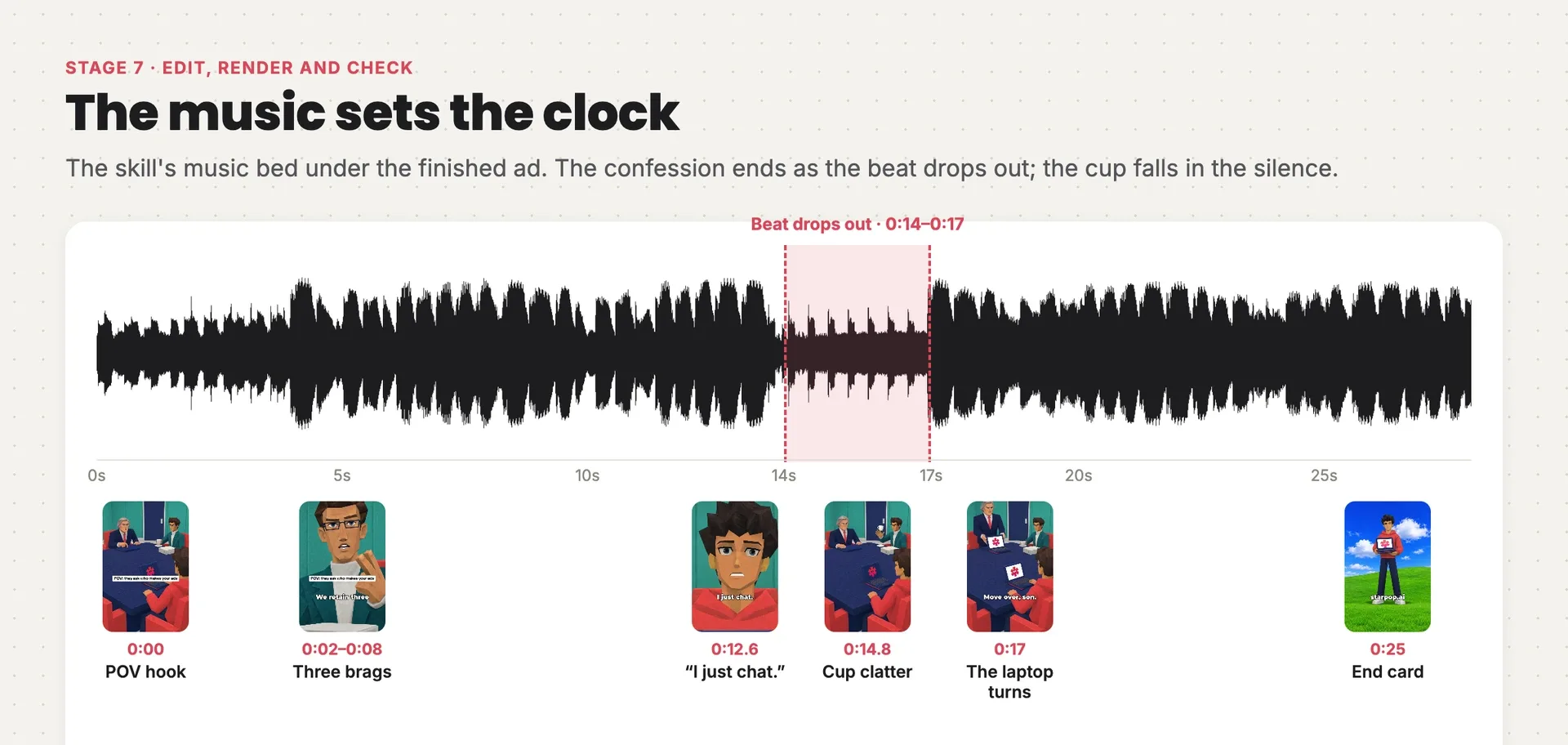
The music bed's waveform under the finished ad: the beat drops out from 0:14 to 0:17, the confession ends at 0:14, the cup clatter lands at 0:14.8 in the silence, and the laptop turns as the beat returns
Cut on the dialogue, with a hard cut on every line. Then build the layers:
- Music: one clip from 0:00, never trimmed at its start or replaced. You can see the drop-out in the waveform: the beat falls away at 0:14 and comes back at 0:17, and that gap times the whole skit. Trim the start and the shock beat no longer lands in the silence. Keep the music well under the dialogue and fade it out over the last half second.
- The shock beat holds 0.5–1.5 seconds with no dialogue. The example holds the cup drop for 1.4 seconds.
- The POV caption sits on the first 3–5 seconds, in bold white type, written casually like a native post: "POV: they ask who makes your ads." The example holds it for 4 seconds.
- Subtitles: 1–4 words per card, white with a heavy outline, just below the center of the frame and timed to the speech. Use a pixel font when your editor can load one; otherwise use the boldest sans you have. Subtitles are also how the joke reads with the sound off.
- Sound effects on every gag. Here that's the cup clatter, made as its own sound effect and placed at 0:14.8, on the impact frame.
- The end card is a still: the hero standing on a bright desktop-wallpaper hill holding the product, with the lower quarter left empty for the URL and one true offer. The skill ships that hill background, so every brand's end card hits the same note.
The example renders at 27.8 seconds, 1080 × 1920 at 30 fps, and −14.2 LUFS. Before you deliver, check that:
- every approved line is present and comes from the right mouth
- the product is visible in most shots
- no generated text or sepia cast slipped through
- the button line lands on its own
- the URL and the offer on the end card are correct
From "please finish the ad" to the finished render took about nine minutes in the chat: the pilot, nine more takes and the edit. Most of your time goes into stages 1 and 2, which is where it should go.
Make your own with the skill
The skill runs all seven stages with these lessons built in:
- the six-slot angle and four ready arenas, with room to invent your own
- the beat sheet locked to the skill's music bed, so the confession, shock and reversal land on the drop-out and the return
- the word-for-word style block, the empty-room master and the product rendered as a game prop
- a pilot on the longest exchange before the rest is generated
- take checks for wrong mouths, dropped lines, a broken look and a drifting hero voice
- the hill end card with your URL and one true offer
It asks you for your product and a clear packshot, any approved claims, your offer and your URL. Then it proposes the angle and the arena for you to approve, before it writes a line of the script.
In Starpop
The skill is built in
Opens a chat with PS2 Cutscene Skit selected and this ad attached as the example.
Start your PS2 cutscene adIn your AI assistant
ChatGPT, Claude, Gemini, Grok
Paste this in. If Starpop isn't connected yet, your assistant walks you through it.
Create a PS2 cutscene skit ad for my product using the ps2-cutscene-ad skill. If Starpop isn't connected, read https://starpop.ai/docs/integrations/mcp.md and help me connect it first.
Want to see every prompt, frame and take from the example? They're all in the full chat. The brunch ad's three drafts and fixes are in its chat.