Contents
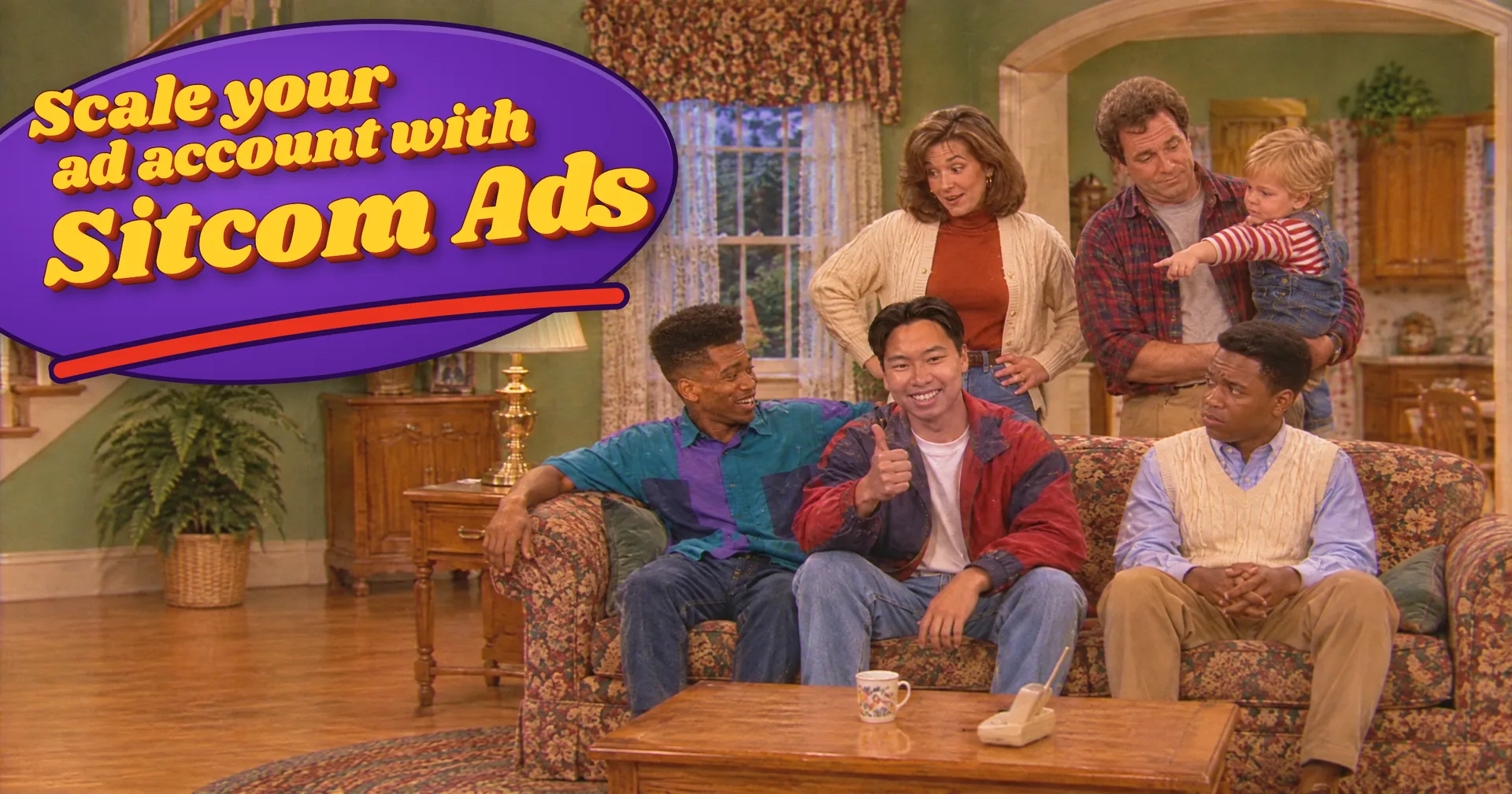
0%Sitcom ads get watched like content: two people bickering in a kitchen, a laugh track under every burn, and the product as the payoff of the joke.
This guide breaks down a 61-second '90s sitcom ad for a greens gummy, made end to end in one Starpop chat: the seven stages, the prompts, and the mistakes that cost the most time.
Sitcom ads are scaling ad accounts right now
The reference for this ad is a '90s living-room skit by Smart Parenting Club: a mom, a dad on the couch, a toddler in a high chair, and the product as the punchline. Between October 21 and November 9 it climbed from #74 to #16 among the brand's active ads, and it's #17 of 174 all time.
Starpop ranks ads by recorded impressions, so a rising rank means the ad is taking a growing share of the account's delivery. It isn't sales data. See the ad and its full rank history.
Smart Parenting Club
The finished ad
Two cousins. Miles wants to leave. Jay is defending his new blender routine, and the routine keeps losing: the drink tastes bad, it's warm, last week's greens went off, and the blender still needs washing. Miles slides a sachet across the island at 0:40, and the ad closes on a callback to the outfit joke from the first ten seconds.
The cast, kitchen, shots, dialogue and audience are all generated. Nothing was filmed.
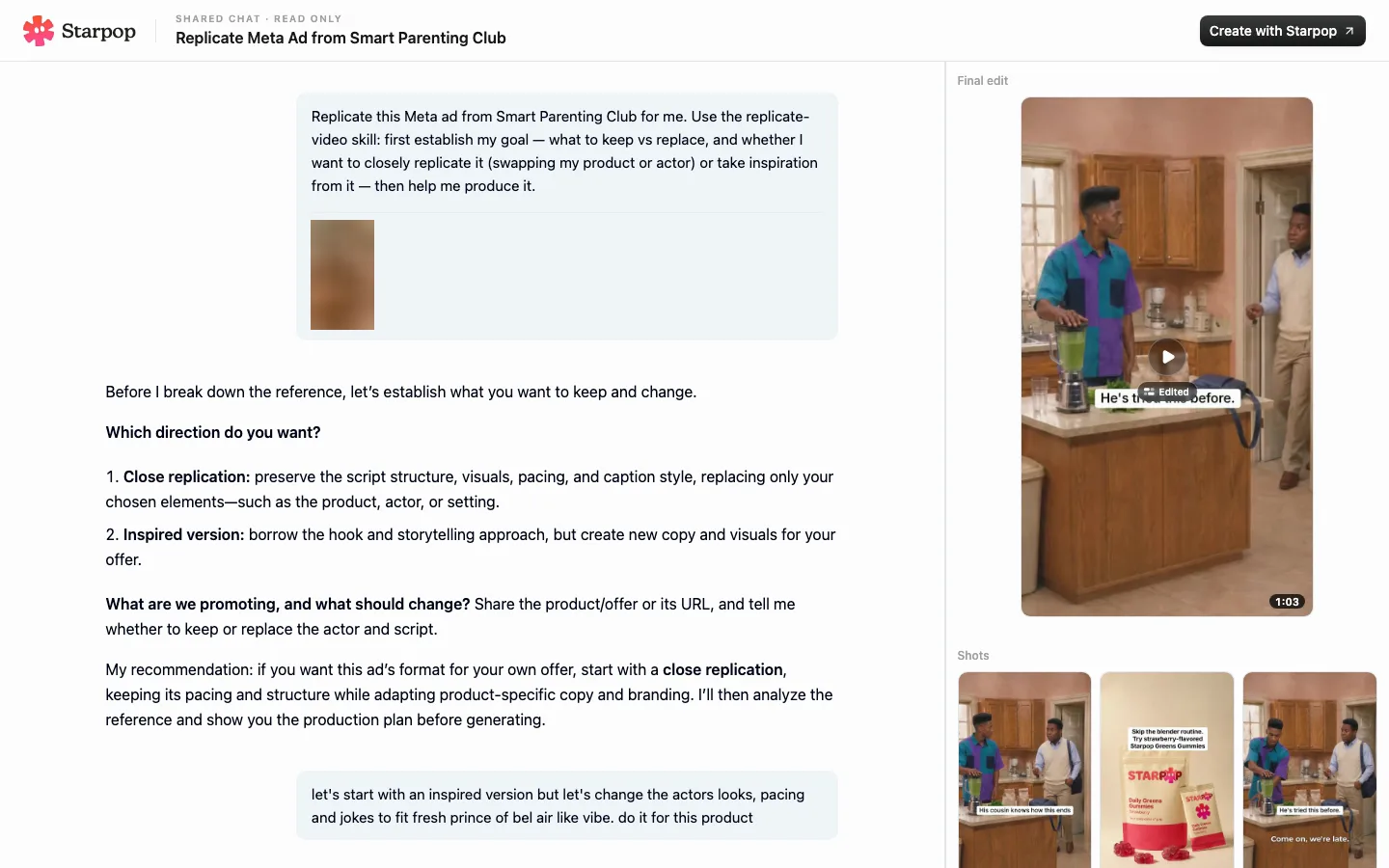
The full chat behind this ad
Open the full chat in Starpop
The 90s sitcom scene skill packages this whole process: the style plate, the writing rules and the production checks. Jump to how to use it.
The process at a glance
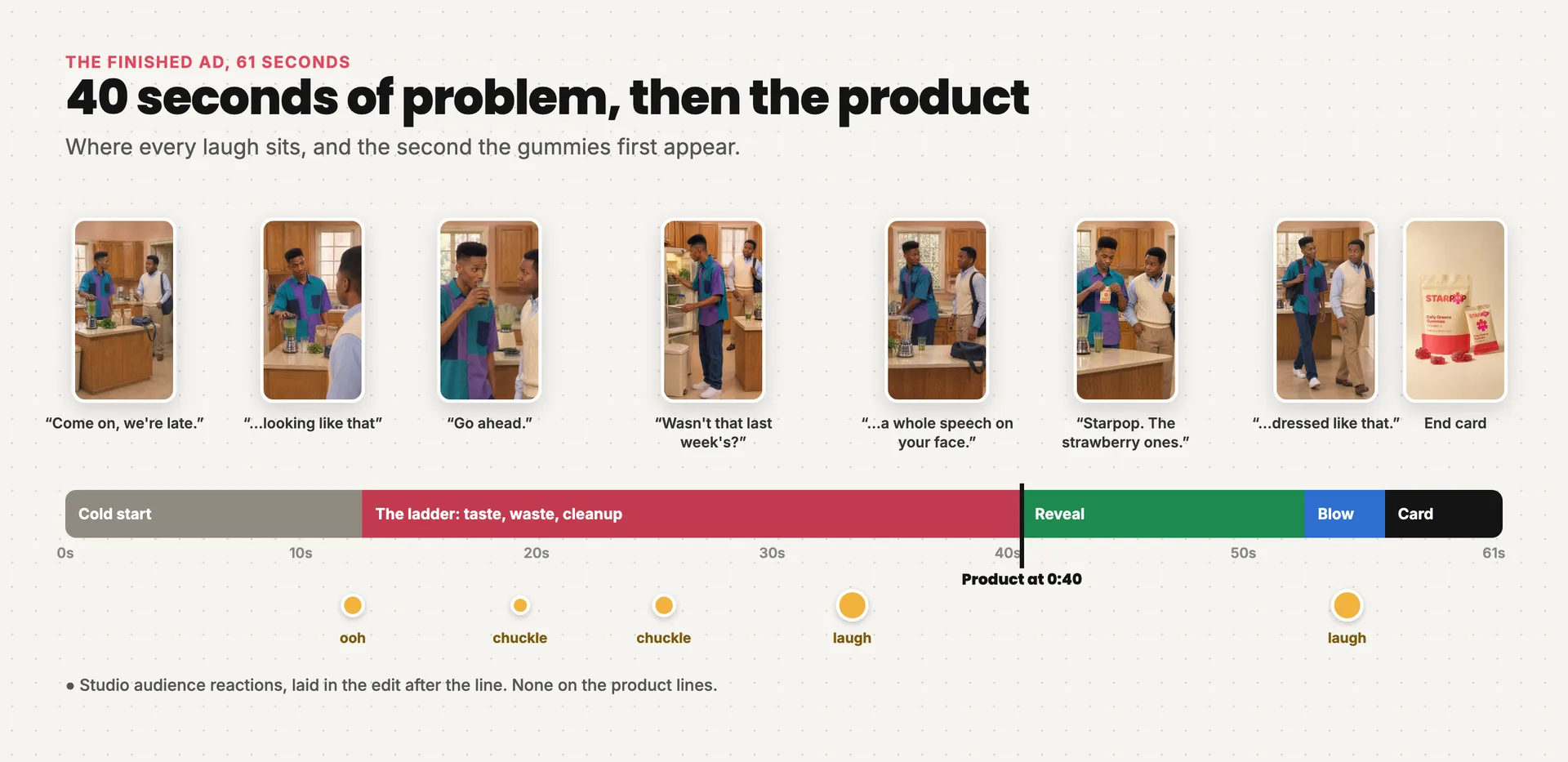
The finished ad on one timeline: the problem until 0:40, then the product, and where each laugh sits
- Set the adaptation. The product, the problem it removes, the close and the comedy mode.
- Write the scene. Two people actually talking, with the product held back until 0:40.
- Storyboard and blocking. Every shot gets a speaker, a physical action and a planned laugh.
- Lock the look and the cast. A style plate, character sheets and a set, each with one job.
- Frames. One opening composition per shot, checked for continuity.
- Scene blocks. Acted, lip‑synced multi‑shot clips in Seedance 2.5.
- Laughs, captions and render. The studio audience, the hook, the end card.
Two rules sit above all seven:
- The script decides everything. Finish it before generating a single picture.
- The product comes late. The first two thirds of the ad are the problem, played out by people the viewer likes.
Stage 1: Set the adaptation
Start from a proven ad and keep its structure: a domestic problem, a skeptical question, the product, a comic payoff. Replace everything else: premise, dialogue, cast, set and pacing.
A named show is a vibe, not a source. "Fresh Prince of Bel-Air vibe" translates into energy, wardrobe and set feel. Characters, names, faces, voices and the set stay original. Catchphrases, theme music, recognizable sets and actor likenesses stay out.
Then pick the comedy mode:
| Mode | The rule | Use it when |
|---|---|---|
| Warm (default) | Jokes, then one warm turn: someone knows someone | Almost every product ad. The reveal reads as care, not a pitch |
| Petty | Tiny stakes, someone gets punished, nobody learns | Irreverent brands |
| Narrated | A character's version gets contradicted by the cut | Before‑and‑after stories |
This ad is warm: Miles has watched Jay quit this routine before, so the gummies read as help, not a sales pitch.
Stage 2: Write the scene
The script is where the ad is won or lost. Two drafts failed here, in the two most common ways.
Failure 1: the product arrives too early. The first draft introduced the gummies within seconds and rushed past the problem. The fix was to hold the product until 0:40 and spend everything before it making the problem worse.
Failure 2: ad beats disguised as dialogue. The second draft had the product in the right place, but the cousins talked like a commercial:
| Ad beats (robotic) | Two people talking (final) |
|---|---|
| Jay: "Wash it. Chop it. Measure it. Blend it." | Miles: "You actually drinking that?" |
| Miles: "Any chance you get to drink it before lunch?" | Jay: "Why you gotta say it like that?" |
| Jay: "I need something I'll actually stick with." | Miles: "Go ahead." (Jay sips, tries to keep a straight face) |
| Miles: "Yeah. That's what I thought." | |
| Jay: "It's warm. I forgot the ice." |
The left column is a copywriter's feature list and a stated sales need. The right column is two people getting under each other's skin, and the problem comes out without anyone explaining it.
The final script:
MILES: Come on, we're late.
JAY:   Give me a second.
MILES: You said that when I was upstairs.
JAY:   And you came down here looking like that,
       so clearly neither of us is ready.

MILES: You actually drinking that?
JAY:   Why you gotta say it like that?
MILES: Go ahead.
       (Jay sips. Tries to keep a straight face.)
MILES: Yeah. That's what I thought.
JAY:   It's warm. I forgot the ice.

MILES: Wasn't that last week's?
JAY:   Don't start.
       (Miles points at the dirty blender.)
JAY:   Man, forget it. I'll do this tomorrow.
JAY:   What?
MILES: Nothing.
JAY:   You got a whole speech on your face.

MILES: Here. These are what I use.
JAY:   Greens gummies?
MILES: Starpop. The strawberry ones.
JAY:   Oh. That's actually good.
MILES: Can we go now?
JAY:   Still not getting in the car with you dressed like that.
The writing rules:
- Characters talk to each other, never to the audience. Nobody explains the problem or states the sales need.
- Not a joke every line. Energy comes from personality, interruptions and reactions. Straight lines play dry.
- Every character wants something right now. Miles wants to leave. That want carries the scene and motivates the reveal: he hands over the gummies to get out the door.
- The problem climbs a ladder. Taste, then waste, then cleanup, each rung shorter than the last.
- Funniest word last, and end on a callback. The final line pays off the outfit joke from 0:10.
Stage 3: Storyboard and blocking
Turn the script into a vertical 9:16 storyboard before generating anything. Each shot gets a speaker, a physical action, a camera and a planned laugh. This ad has 14 shots.
Group shots into scene blocks of 10 to 15 seconds that end on a dialogue boundary. Each block becomes one video generation.
Plan movement here: who is trying to leave, who is busy, who crosses the room. Under-planned movement shows up later as static, slow clips that need regenerating (see stage 6).
Stage 4: Lock the look and the cast
The hardest visual problem is the grain.
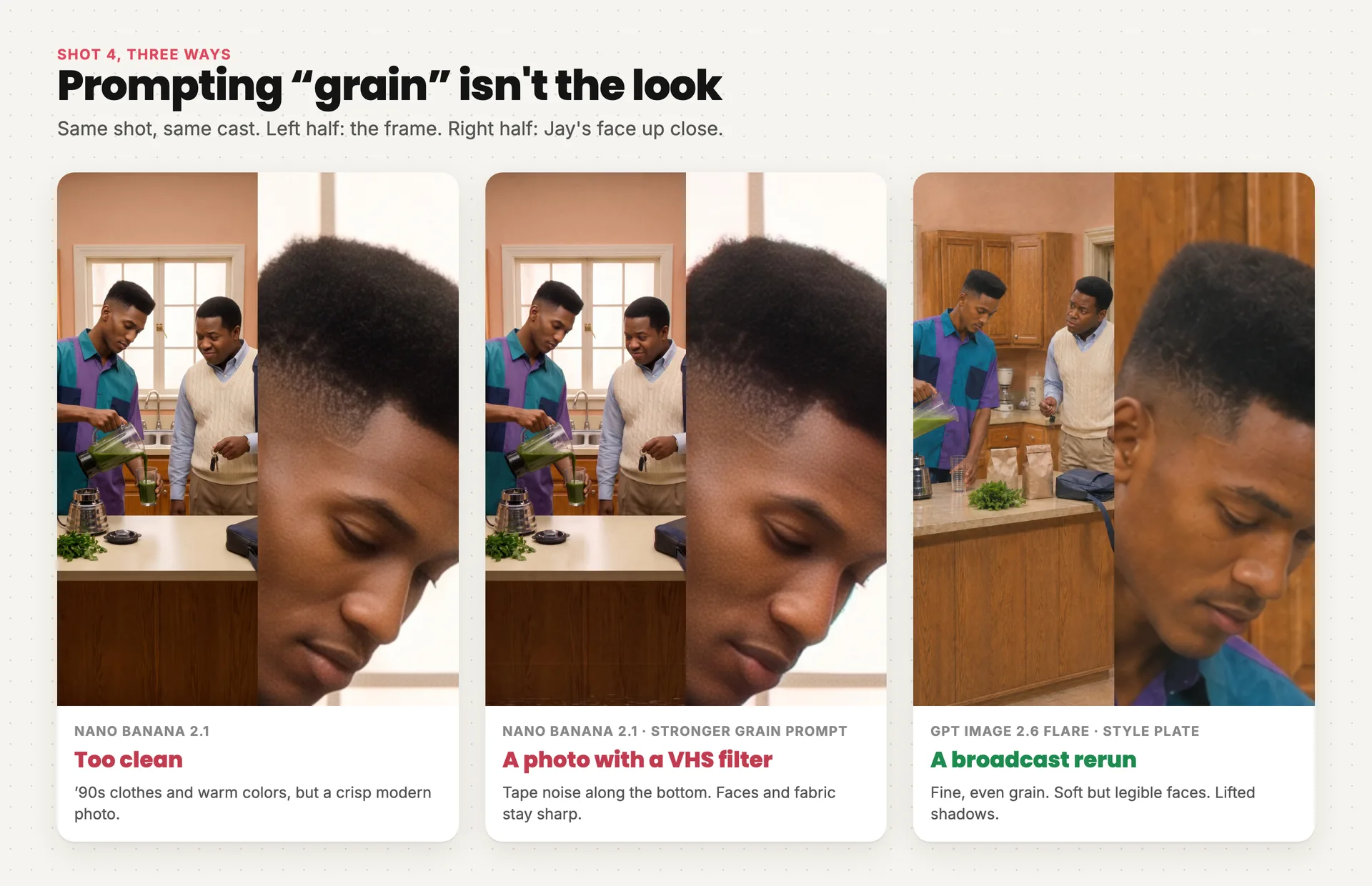
Shot 4 three ways: too clean, a VHS filter, and the broadcast look
- '90s wardrobe and color alone still look like a clean modern photo.
- Asking for "more grain" makes it worse: tape noise along the bottom, faces still razor sharp.
- GPT Image 2.6 Flare gets the broadcast texture right.
A screenshot of a real '90s sitcom is useful as a target to judge against. Never feed it into a generation.
Use an empty set as the style reference
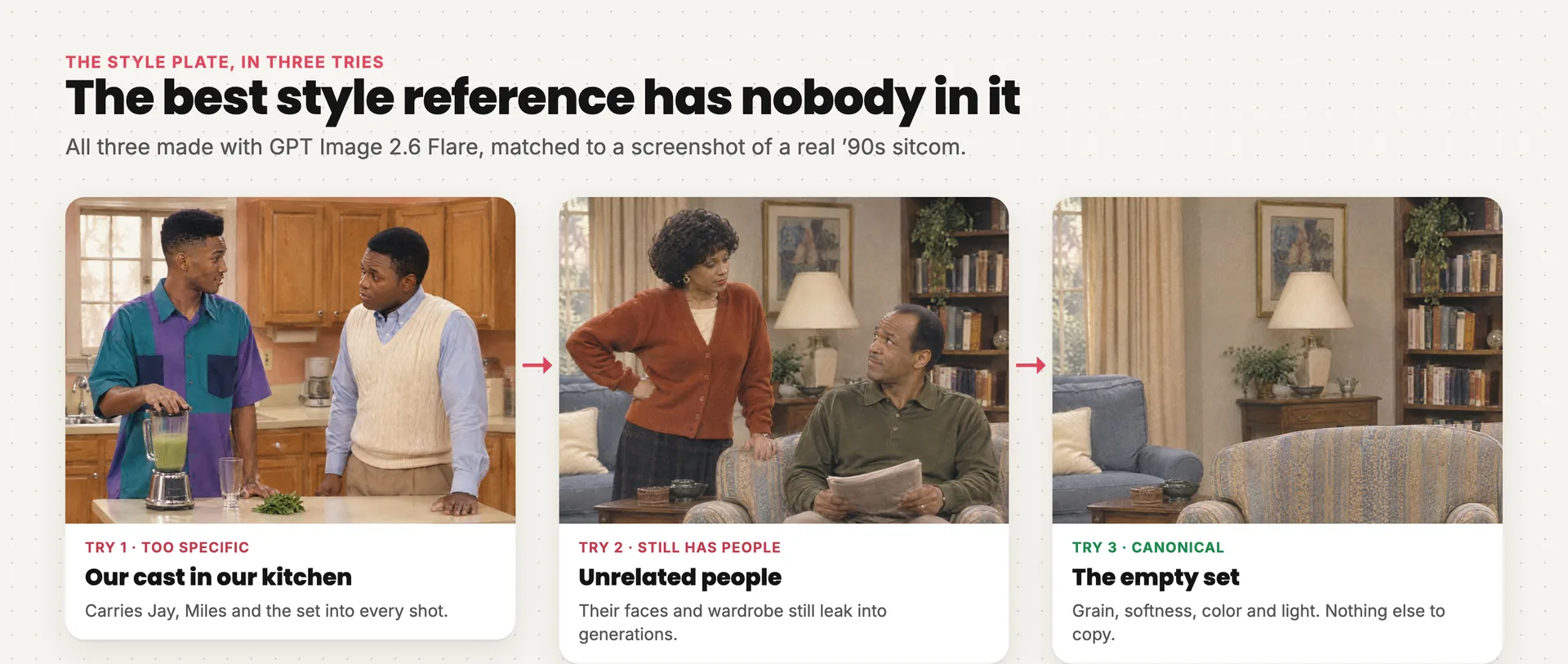
The style plate in three tries. The empty set won
A style image with your own cast in it locks the look to those people. One with unrelated people leaks their faces and wardrobe into every generation. The best style reference has nobody in it. An empty set shows how the look treats cloth, wood, walls, shadow and light, and gives the model nothing else to copy.
That empty set is the style plate, attached to every still and every video generation as style only. It was made in two passes: first the room with people, then this edit to empty it:
Style: General canonical style reference for photographic early-1990s American multicamera family television sitcom imagery. Preserve image 1's fine evenly distributed visible analog broadcast grain, soft but legible detail, restrained warm-neutral color response, gently lifted shadows, compressed highlights, subtle chroma bleed, moderate depth of field and broad soft studio lighting. Do not modernize or clean up the capture medium.

Visual: The same living room as image 1, now entirely empty of people. Remove the standing woman and seated man, their bodies, hands, clothing and the newspaper held by the man. Naturally reconstruct the chair upholstery, floor and background surfaces that they occluded. This is a quiet empty sitcom set demonstrating how the style treats cloth, wood, walls, shadow and highlights, independent of any character or brand.

Constraints: No people, body parts, faces, silhouettes, human reflections, portraits, mannequins or character illustrations. No text, captions, logos, watermarks, borders, timestamps, CRT bezel, heavy scanlines, glitches, tape damage, sepia or film scratches. Do not sharpen, denoise, smooth, beautify or erase the fine analog grain.
Give every reference one job
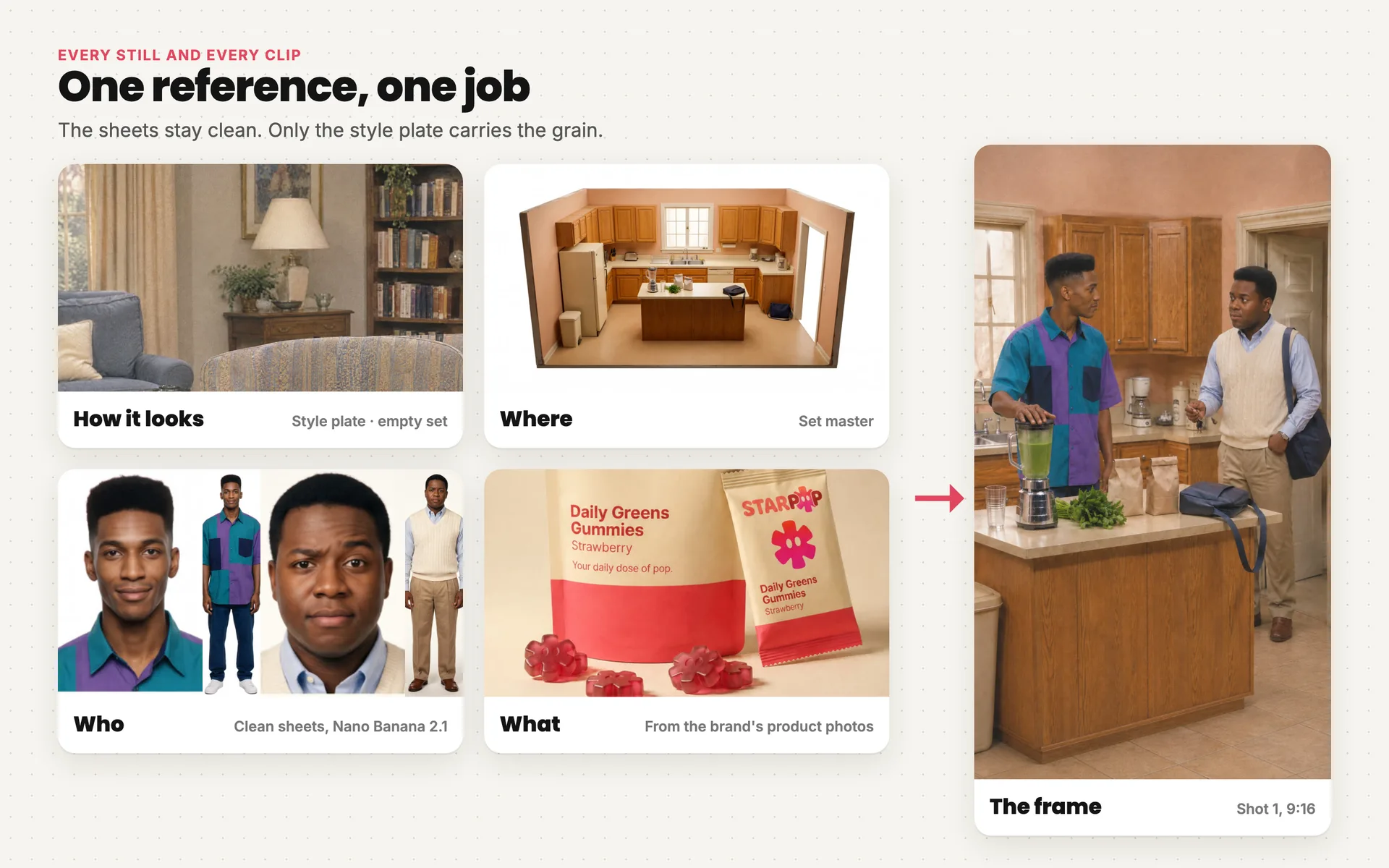
Each reference does one job, and together they make shot 1
The plate carries the look, the character sheets carry identity, the set carries the space. Use clean character sheets (these were made with Nano Banana 2.1). Sheets with grain baked in are weaker identity references. Keep identity sharp and let the plate handle texture.
Stage 5: Frames
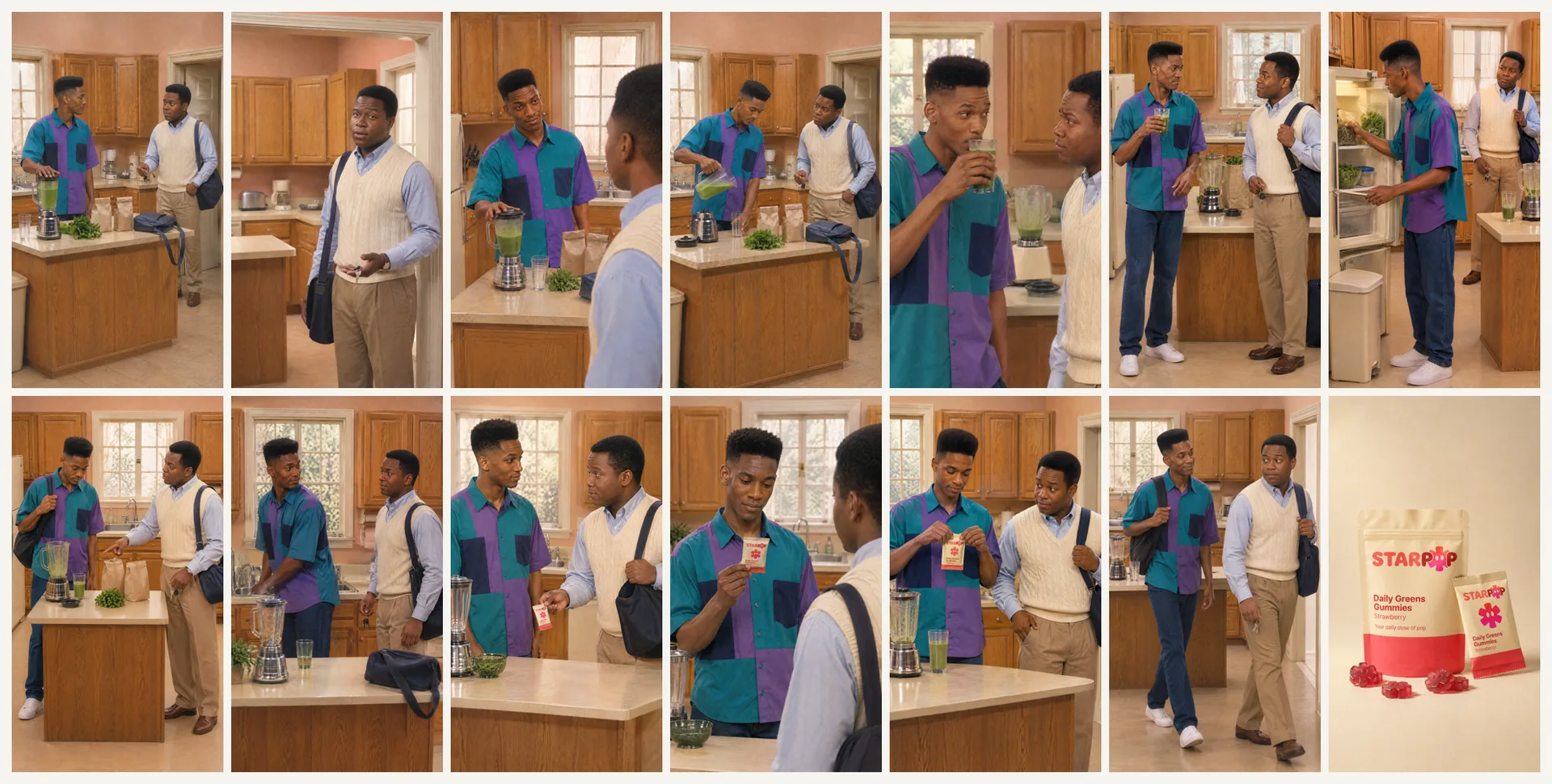
All 14 opening frames, made with GPT Image 2.6 Flare
Make one 9:16 opening frame per shot, each with the style plate, the characters in it, the set and, after 0:40, the product. Check every frame before animating:
- each character in their own position, face and wardrobe, never swapped or blended
- props on the same side and in the same state as the previous shot
- grain that matches the plate
- no product before the reveal
In this ad the check caught a wide shot with the cousins in each other's roles and a close‑up that blended both faces. Fixing a frame costs one image. Fixing it after animation costs a video generation.
Stage 6: Scene blocks
Each scene block is one Seedance 2.5 generation: several shots, both actors, lip‑synced dialogue and the cuts between them.
- Generate at 480p. The look is a soft broadcast picture anyway, and every attempt costs less.
- Run the opening block as a pilot. Approve it before generating the rest.
- Fix small errors with pickups. A changed word and an exit take that walked back into the kitchen were each fixed with a short pickup generation, not a full block redo.
The biggest problem the checks miss is pacing. The first cut had actors standing still to deliver lines and an exit in what looked like slow motion:
Speeding the clip up would pitch the voices. Regenerate the movement instead: Miles crossing toward the door, Jay working while he talks, lines delivered mid‑stride. The exit prompt:
All movement NORMAL REAL-TIME adult walking, brisk lively physical comedy. Absolutely no slow motion.

Shot 13 (0–6s): ONE continuous moving shot. Start both already walking, not stationary. Miles RIGHT leads OUT OF KITCHEN through screen-right doorway at ordinary brisk adult pace, roughly two footfalls per second. Jay follows LEFT one pace behind. Jay speaks while walking, not after stopping. Miles briefly glances back with offended eyebrow IN MID-STRIDE, then faces forward and continues out; never stops to pose.

Script: Jay ONLY, exact native on-camera line once, spoken while moving: "Yeah. Still not getting in the car with you dressed like that."

Constraints: Normal real-time walking, natural leg cycles and foot contacts, no slow motion or speed ramp. No subtitles, music, laughter, applause or added effects. Native dialogue and quiet room tone only.
The rule: characters are always physically doing something while they talk. Standing still and delivering lines reads as dead air.
Stage 7: Laughs, captions and render
Generate clips with dialogue and room tone only, never a laugh track. Lay the audience in the edit, so every laugh sits exactly where it belongs:
- only after real jokes, in the pause after the line, never over it
- a chuckle for small beats, a bigger laugh for solid ones, one "ooh" at most, on a burn
- nothing on the product lines
- below the dialogue, with the tails faded out
This ad has five: an "ooh" on the outfit burn, chuckles on the sip and the ice, a laugh on "I'll do this tomorrow", and a laugh on the final callback.
Then the text on screen:
| Weak | Final | Why | |
|---|---|---|---|
| Hook | "He's tried this before" | "His cousin knows how this ends" | A question about a person, not the product |
| End card | "Meet Starpop" | "Skip the blender routine. Try strawberry-flavored Starpop Greens Gummies" | Pays off the scene's pain, then gives the action |
Final polish happens in the timeline editor: swapping clip ranges, retiming captions, moving laughs. The render is 61 seconds at 1080 × 1920, with the product first on screen at 0:40.
Two trade-offs to expect:
- Tight close‑ups are crops of 480p footage, so they're softer than the wides.
- Generated crowd samples carry more room ambience than the voices, so fade them in the mix.
Make your own with the skill
The skill runs all seven stages with these lessons built in:
- the empty‑set style plate, attached to every still and every clip
- the writing rules, the cast slots and the 60‑second clock, with the product held back until about 0:40
- blocking and movement in every shot, and no slow motion
- frame and block checks for swapped actors, prop jumps and product leaks
- laughs only on real jokes, plus a hook and an end card with a clear "so what"
It asks for your product and a clear packshot, the everyday frustration it removes, your offer and CTA, and optionally the show whose vibe you want. Then it writes the scene for you to approve line by line before generating a single frame.
In Starpop
The skill is built in
Opens a chat with 90s sitcom scene selected and this ad attached as the example.
Start your sitcom ad
In your AI assistant
ChatGPT, Claude, Gemini, Grok
Paste this in. If Starpop isn't connected yet, your assistant walks you through it.
Use Starpop's sitcom-short skill to make a '90s sitcom ad for my product. If Starpop isn't connected, read https://starpop.ai/docs/integrations/mcp.md and help me connect it first.
Every prompt, frame and take from this ad is in the full chat.