Contents
0%Hey!
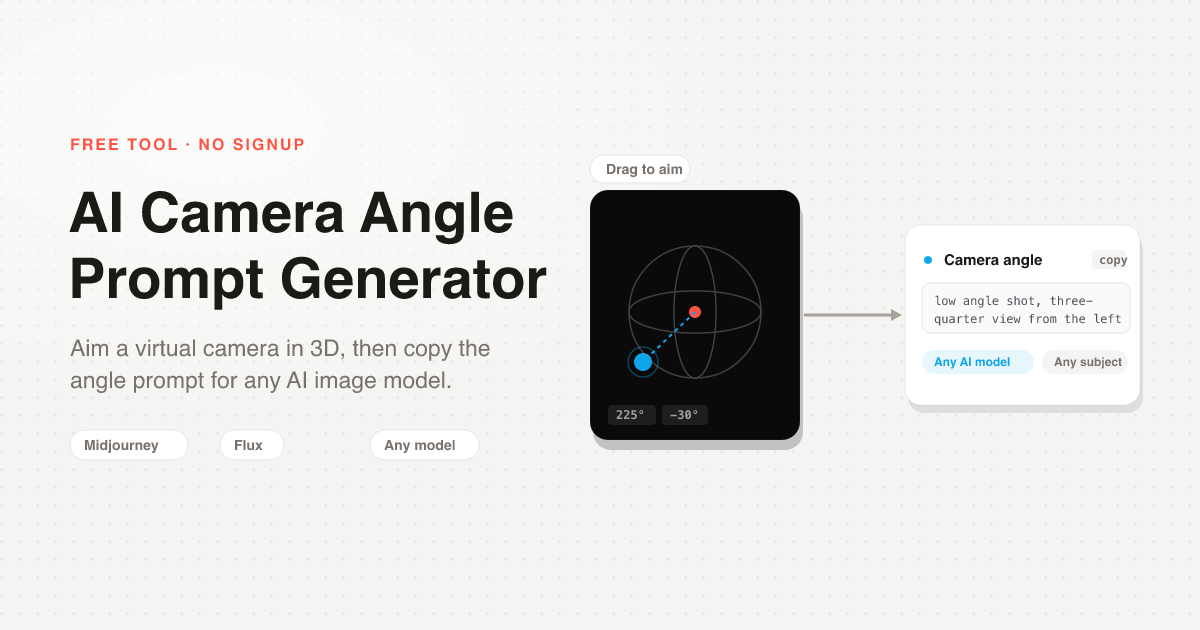
I built a free AI Camera Angle Prompt Generator: drag a camera around your product on a 3D globe, and it writes the camera angle as a prompt you paste into any AI image model. No login, no credits, no watermark.
The Problem It Solves
Getting the camera angle right in an AI image prompt takes guessing. You either know the photography terms (low angle, three-quarter view) or you regenerate until the shot looks right.
It gets worse across a catalog. Every product should be shot from the same angles, and that only happens if every prompt uses the same words.
What It Actually Does
It writes the prompt. It does not render the image.
You drag the globe to place the camera, and the tool writes a phrase like Low angle shot, three-quarter view from the left. You paste that into your own image model to make the shot, so it works with Midjourney, Flux, Nano Banana, GPT Image, or Starpop.
The output is one line of plain text. Nothing is generated, so nothing costs credits.
Coming From Higgsfield Angles?
If you have used Higgsfield Angles, dragging a 3D camera around your subject will feel familiar. The difference is what happens after:
- Higgsfield Angles renders a new image at the angle you pick. It needs an account and runs on credits.
- This tool writes the camera angle as text. It is free, needs no login, and works with whatever image model you already use.
Use Higgsfield when you want it to make the finished image in its own models. Use this when you already have a model you like and only need the angle.
How To Use It
There is nothing to install.
Open the tool
Go to the free Camera Angle Prompt Generator. No account needed.
Place the camera
Drag the globe to move the camera around your subject, or tap a quick angle like Low angle or 3/4 left. Add a product photo if you want to see the angle against your real product; it stays in your browser and is never uploaded.
Copy the prompt
The tool writes the camera angle as one phrase. Copy it with one click.
Paste it into your AI model
Add the phrase to the end of your image prompt in Midjourney, Flux, or any other model, and generate.
The 32 Angles It Writes
You do not need to know the terms. The camera snaps to one of 4 heights and one of 8 sides, and the prompt names both:
- Heights: low angle shot, eye level, high angle shot, and high angle looking down from above
- Sides: from the front, from behind, the left and right side profiles, and the four three-quarter views (front left, front right, behind left, behind right)
Here is the tool's output added to real product prompts:
- Hero shot:
A white running sneaker on a concrete step, soft morning light. Low angle shot, from the front. - Catalog angle:
An amber glass serum bottle on a beige backdrop, studio lighting. Eye level, three-quarter view from the left. - From above:
A ceramic coffee mug on a wooden table. High angle shot, looking down from above, from the front.
Works With Midjourney, Flux, Stable Diffusion, and More
The output is plain text, so it works in any model. In Midjourney, put it before your parameters (... Low angle shot, three-quarter view from the left. --ar 4:5); in Flux, Stable Diffusion, or Nano Banana, add it to the end of the prompt. Keep the rest of the prompt the same and only the camera changes.
Why This Matters For E‑commerce Brands
If you sell physical products, matching angles are what make a store look shot in one session instead of pieced together. Pick your set once, for example a low angle hero, a three-quarter view, and a shot from above, and reuse the same phrases for every product.
The prompt is step one. In Starpop you can take one product photo and generate it from the angles you pick, with no studio and no reshoot.
Next Steps
All free:
- Use the free Camera Angle Prompt Generator. Place the camera, copy the prompt, paste it anywhere. Open the tool.
- Make the shot in Starpop. Turn one product photo into ad-ready images from every angle. Try Starpop.
- Join the free Skool community. I post new free tools and ad breakdowns there first. Come hang out.
Pick your best-selling product, place the camera where you wish you had a photo, and copy the prompt.
Open the Camera Angle Tool (free)