What does the output look like?
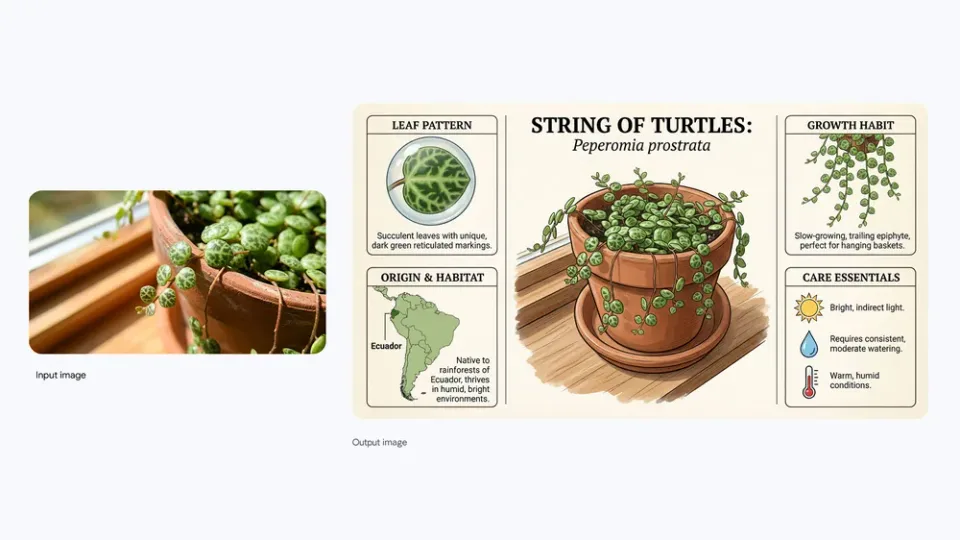
From plant photo to care infographic
Google’s example pairs an input plant photo with the illustrated care guide generated from it.
Google example: Nano Banana Pro announcementWhat can Nano Banana Pro do?
High-resolution image generation up to 4K quality
- High-resolution campaign artwork
- Detailed product and editorial compositions
- Final image edits up to 4K
- Inputs
- Text, Image
- Aspect ratios
- Match source, 1:1, 2:3, 3:2, 3:4, 4:3, 4:5, 5:4, 9:16, 16:9, 21:9
- Output options
- 2K, 1K, 4K
- Typical generation time
- About 1 minute
- Developer
- Pro uses more credits and takes longer than the faster Nano Banana routes.
- Validate text, layout, and subject placement at a lower-cost stage before finishing at 4K.
How much does Nano Banana Pro cost?
Base estimate
$0.20–$0.30 USD / image
2–3 credits / image
Estimated dollar cost uses the Solo monthly plan at $0.10 USD per credit. Your cost per credit depends on your plan.
Prices are per output image. Resolution, quality, reference images, and editing mode can affect the charge. Check the total shown in Starpop before generating.
How to use Nano Banana Pro
- Click “Create with Nano Banana Pro” and sign in or create an account. After setup, Starpop opens a new image workspace tab with the model selected.
- Describe a new image, or attach the product, subject, and style references needed for the edit.
- Choose the aspect ratio and output resolution. For multiple references, identify which part of the image each should control.
- Review the credit estimate and generate. Check the result in your workspace, then download it or adjust your inputs to try again.