What does the output look like?
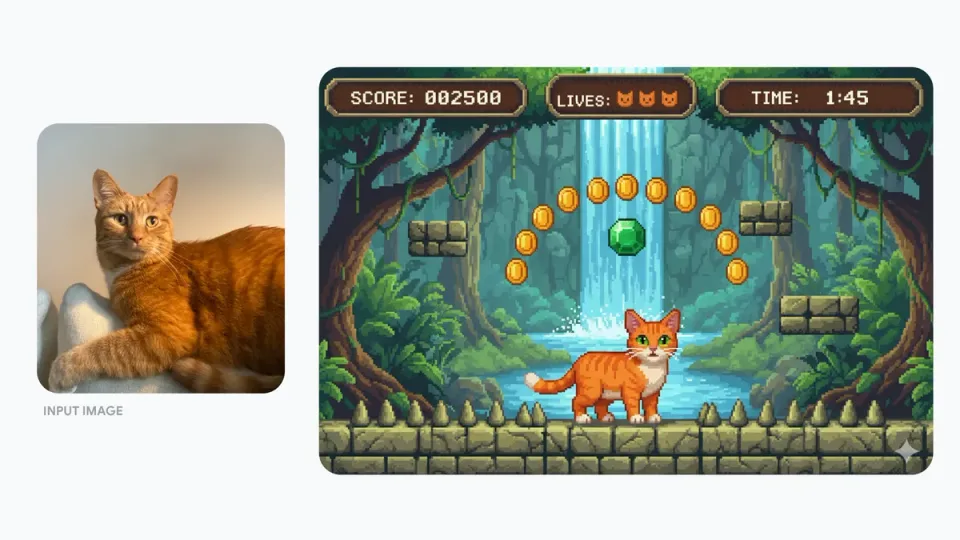
Turn a pet photo into game artwork
Google’s before-and-after example turns a cat photo into a pixel-art character and game scene.
Google example: Nano Banana official examplesWhat can Nano Banana do?
Fast, affordable image generation with broad aspect ratio support
- Fast campaign concept generation
- Everyday image editing
- Multi-format social and advertising assets
- Inputs
- Text, Image
- Aspect ratios
- Match source, 1:1, 2:3, 3:2, 3:4, 4:3, 4:5, 5:4, 9:16, 16:9, 21:9
- Typical generation time
- About 22 seconds
- Developer
- Use a higher-resolution specialist when the final deliverable depends on fine text or very small details.
- When editing, clearly distinguish the elements that must remain from the requested change.
How much does Nano Banana cost?
Base estimate
$0.10 USD / image
1 credit / image
Estimated dollar cost uses the Solo monthly plan at $0.10 USD per credit. Your cost per credit depends on your plan.
Prices are per output image. Resolution, quality, reference images, and editing mode can affect the charge. Check the total shown in Starpop before generating.
How to use Nano Banana
- Click “Create with Nano Banana” and sign in or create an account. After setup, Starpop opens a new image workspace tab with the model selected.
- Enter an image description, or attach a source image and describe your changes.
- Choose the aspect ratio for the intended placement, or match the input image when keeping its existing format.
- Review the credit estimate and generate. Check the result in your workspace, then download it or adjust your inputs to try again.