Contents
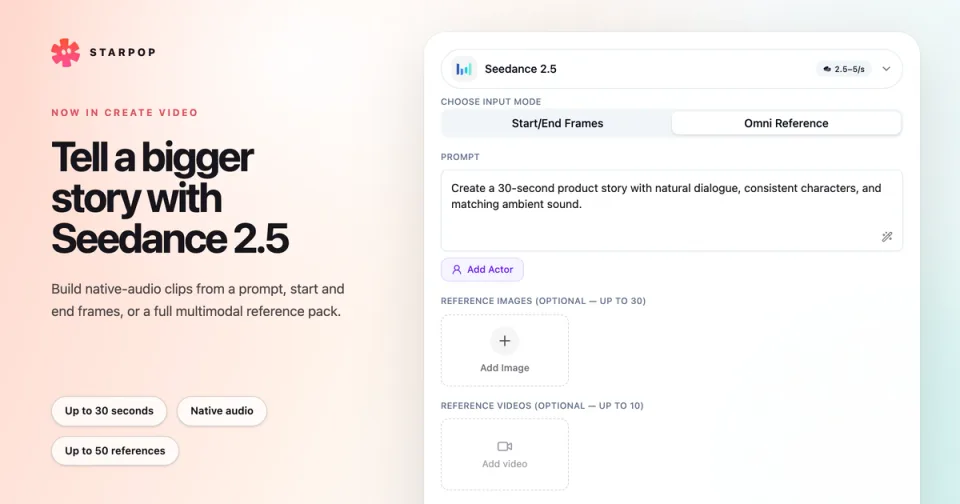
0%Seedance 2.5 is now available in Starpop. You can use it to create native-audio videos up to 30 seconds long from a prompt, start and end frames, or a larger pack of image, video, and audio references.
What you can create
Seedance 2.5 gives you three practical starting points:
- Text only: Write a prompt and generate without adding reference media.
- Start/End Frames: Add a required Start Frame and an optional End Frame to direct the transition between two visual states.
- Omni Reference: Combine images, videos, and audio to define the people, product, movement, setting, pacing, and sound for a scene.
Every generation includes audio. Output controls cover durations from 4 to 30 seconds, 480p or 720p resolution, and six aspect ratios: 16:9, 9:16, 1:1, 4:3, 3:4, and 21:9. You can also request up to 10 video variants in one run.
How to use Seedance 2.5
Open Create video
Go to your Starpop workspace, open Create video, and select Seedance 2.5 from the model picker.
Choose an input mode
Use Start/End Frames for a controlled transition between images. Use Omni Reference for text-only creation or a mixed reference pack.
Write the prompt and add references
Describe the scene in chronological order. In Omni Reference mode, add the images, videos, and audio that should guide the result. Use Add Actor when you want to mark one image as the actor reference.
Set the output
Choose the number of videos, aspect ratio, duration, and resolution. The credit total updates with your selections and the length of any reference videos.
Generate
Select Generate Video. Your new generations will appear in the workspace when they are ready.
Omni Reference accepts up to 30 images, 10 videos, and 10 audio files, with a maximum of 50 reference files altogether. Audio references need at least one image or video reference. Start/End Frames accepts one or two images and does not use video or audio references.
Build a clearer reference pack
More references are useful when every file has one job. For example:
- Use product images to establish packaging and color.
- Use an actor image to establish the person on screen.
- Use a reference video for movement, performance, or camera direction.
- Use reference audio for dialogue delivery, music, ambience, or pacing.
Name each reference in the prompt—such as “Image 1,” “Video 1,” or “Audio 1”—and state what the model should take from it. Avoid giving two files conflicting roles.
Reference videos can total about 30 seconds, and reference audio can total about 30 seconds. Keeping the pack focused makes it easier to write an ordered prompt and review the result.
Where Seedance 2.5 helps most
A complete product story: Use the longer duration for a hook, problem, product moment, payoff, and closing shot in one generation.
Consistent UGC direction: Combine an actor, product images, a movement reference, and an audio reference instead of asking one prompt to define every detail.
Controlled transitions: Use Start/End Frames when the opening and closing composition matter more than a large reference pack.
Use it in chat and reuse your setup
Seedance 2.5 is also available in Starpop's AI chat. Chat can prepare a Seedance 2.5 video draft with the prompt, reference media, duration, aspect ratio, resolution, and variant count ready for you to review before generation.
After a generation, Reuse inputs reopens its available prompt, references, and settings in Create Video. That makes it easier to adjust one part of a successful setup without rebuilding the form from scratch.