AI Claymation Ad Skill
Make AI claymation ads with Starpop.
Turn your product and selling angle into an original clay world with a script, recurring characters, tactile scenes, voiceover, and animation.
What is an AI claymation ad?
An AI claymation ad is a generated video advertisement designed to look like practical stop-motion animation made from clay or plasticine. The product, characters, props, and sets share the same tactile material language across every scene.
The strongest examples do more than apply a clay filter. They establish one repeatable clay world, storyboard the selling idea, and animate each shot with deliberately stepped movement.
Download the free AI claymation skill file
The public claymation SKILL.md gives an AI agent the full production order, tactile style lock, prompt structure, continuity rules, and failure fixes.
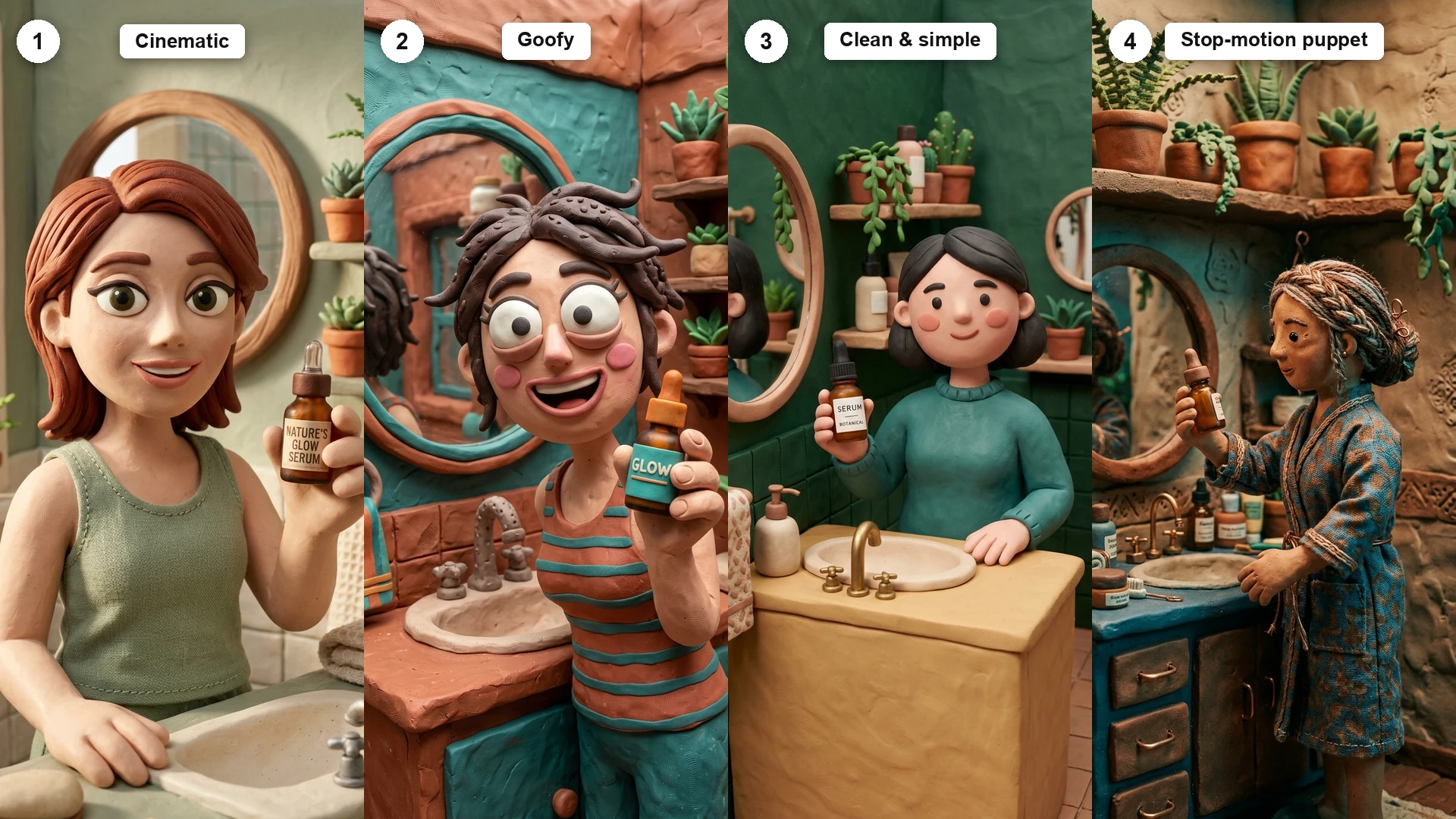
The Claymation skill knows the style. Starpop does the work.
A downloaded skill file gives an AI agent instructions. In Starpop, that skill runs inside a product-aware creative workflow: the all-in-one agent helps write the script and prompts, stages the generations, and keeps the ad moving from idea to finished scenes.
Grounded in your product
Give the agent your product, brand, customer angle, and references so every creative decision starts from the real brief.
Guided by a style skill
A dedicated SKILL.md adds the visual rules, prompt structure, continuity checks, and failure fixes for the ad style.
Prompts become generations
The agent writes the script and production prompts, then stages the image, video, voice, and music generations in one workspace.
Review and regenerate
Review the ad shot by shot and regenerate only the scene, voice, or motion that needs another take.
AI claymation ad examples
Generated end to end in the goofy sub-style. Watch the material consistency, the miniature staging, and the deliberately stepped motion that keeps it reading as real clay.
How to make AI claymation ads
Use one connected workflow to move from the customer angle to a locked tactile stop-motion direction and finished animated scenes.
Choose the product angle
Start with the customer problem, mechanism, transformation, objection, or comparison the ad needs to communicate.
Write the script and shots
Choose voiceover, dialogue, music, or silent graphic storytelling, then give every shot one visible purpose.
Lock the visual direction
Approve the recurring subjects, product reference, materials, palette, lighting, and scene rules before animation.
Generate and refine each scene
Animate the approved frames, review continuity, and regenerate only the shots where the product, subject, or motion needs another take.
The claymation style recipe
A believable clay ad comes from consistent physical rules, not from repeating the word claymation in every prompt.
Material
Matte plasticine, visible fingerprints, hand-tooled seams, soft edges, and tiny surface imperfections.
World
Miniature sets and props built from the same material family as the characters.
Motion
Purposefully stepped poses, simple gestures, restrained camera moves, and clear transformations.
Continuity
One approved character, product reference, palette, and set description used in every scene.
When Claymation ads work best
- Playful product transformations and before-and-after stories
- Food, supplements, beauty, wellness, gifting, and family brands
- Mechanism ads that need a simple tactile visual metaphor
Common Claymation ad mistakes
Generating before the visual rules are locked01
Approve the reusable subjects, product treatment, palette, materials, and scene rules before generating a long sequence.
Letting the style replace the selling idea02
The visual direction earns attention, but the script still needs a customer problem, product mechanism, proof, and clear next step.
Changing the prompt language between scenes03
Repeat the approved style lock and reference roles in every generation so the ad feels like one world.
Trying to fix every scene at once04
Review shot by shot and regenerate only the weak moment instead of destabilizing the approved parts of the ad.
Explore every AI animation ad style
Compare this direction with cinematic 3D, claymation, paper, editorial collage, song, skeleton, wool, anime, watercolor, and Zack D. Films-style explainers.
Read the claymation ad guideClaymation skill file questions.
Can I make AI claymation ads in Starpop?
Yes. Starpop can help develop the product angle, script, visual direction, recurring references, generated scenes, audio, and review workflow for Claymation.
Is the Claymation skill file free to download?
Yes. The public claymation-animation-SKILL.md file can be downloaded from this page without signing in. It contains the workflow and style-specific instructions an AI agent needs to help create this type of ad.
What is included in the Claymation SKILL.md?
The skill file includes the production order, visual rules, prompting guidance, continuity checks, and common failure fixes specific to Claymation.
Can I use the skill file outside Starpop?
The file uses the portable SKILL.md format. An AI agent that accepts Markdown skill or instruction files can read it, while Starpop provides the connected product, scripting, media-generation, and review workflow.
Why use Starpop with the Claymation skill file?
The skill file provides portable style instructions. In Starpop, an all-in-one product-aware agent applies those instructions to your brief, helps write the script and prompts, stages image, video, voice, and music generations, and keeps the review process moving scene by scene.
Can Starpop keep the product consistent across scenes?
The workflow establishes an approved product and subject reference before scene generation, then reuses those references and the same visual rules in each shot. Weak scenes can be regenerated individually.
Turn your product into Claymation.
Bring the product, customer angle, or reference. Starpop helps shape the script, visual direction, and finished animated scenes.