Contents
0%ElevenLabs has become one of the most capable AI audio platforms available, and its API is how developers actually put that power to work. If you're searching for ElevenLabs API documentation, you likely need specifics: authentication setup, endpoint references, SDK examples, and practical code you can drop into a project. This guide covers all of it.
At Starpop, we integrate ElevenLabs directly into our platform alongside other frontier AI models, giving marketers access to studio-grade voice generation and cloning without juggling multiple subscriptions. That hands-on integration means we've spent real time inside the API, and we know where developers tend to get stuck. Building with this API is straightforward once you understand the structure.
Below, you'll find a complete walkthrough of ElevenLabs' REST API: how to authenticate, which endpoints handle text-to-speech and voice cloning, request/response formats, SDK options for Python and JavaScript, and working code examples you can adapt immediately. Whether you're adding AI narration to an app or automating audio production at scale, this is the reference to keep open.
What you need before you start
Before you write a single line of code, a few things need to be in place. The ElevenLabs API documentation assumes you already have an active account and a working development environment set up. Skipping this setup phase is the fastest way to waste time troubleshooting errors that never needed to happen. Here is what you need before you touch an endpoint:
- An ElevenLabs account (free or paid)
- An API key generated from your profile settings
- Python 3.8+ or Node.js 18+ installed locally
- The official ElevenLabs SDK for your chosen language
- A way to handle binary audio output (ffmpeg recommended)
Account and API access
Your ElevenLabs account tier directly controls how much audio you can generate each month. Free accounts give you a limited character quota, which works for testing endpoints but falls short for production workloads. Paid plans unlock higher limits, voice cloning, and access to advanced models like Turbo v2.5. Sign up at elevenlabs.io, navigate to your profile settings, and generate an API key from there. Treat that key exactly like a password from the moment you create it.
Store your API key in an environment variable. Never hardcode it into your source files or push it to a public repository.
Dependencies and environment setup
You install the SDK with a single command, and it handles authentication and request formatting automatically for you. Choose the version that matches your preferred language:
# Python
pip install elevenlabs

# Node.js
npm install @elevenlabs/api
After installing the SDK, confirm that ffmpeg is available on your system. ElevenLabs API responses return raw binary audio data, and ffmpeg gives you the tools to play, convert, and export that audio in whatever format your project requires.
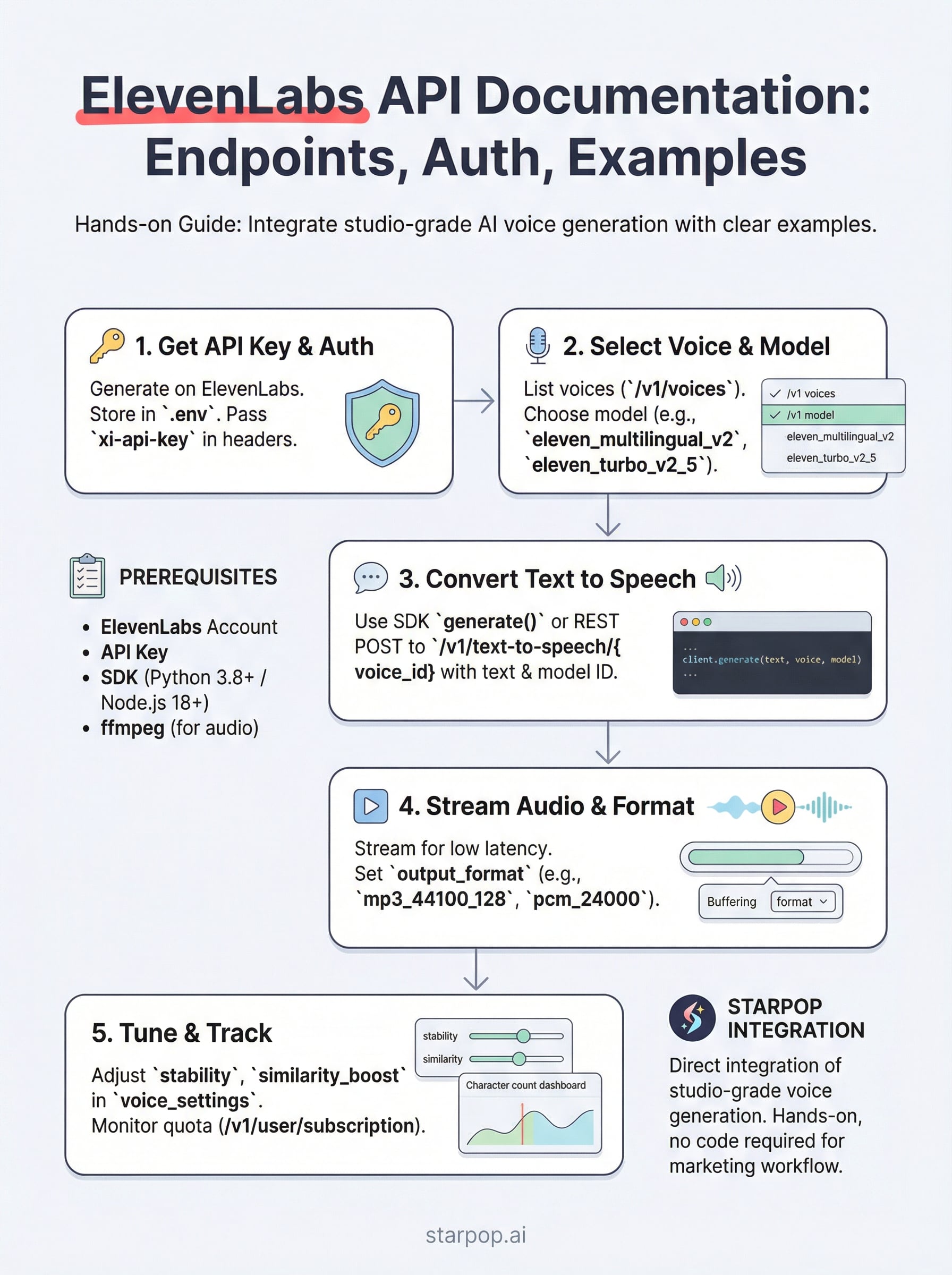
Step 1. Get your API key and set up auth
The ElevenLabs API documentation points you to one starting place: your API key. Without it, every request returns a 401 error, so getting authentication right first prevents you from debugging the wrong problems later. This step takes less than five minutes.
Generate and store your key
Log in to elevenlabs.io, open your profile settings, and click "API Keys" to generate a new key. Copy it immediately and store it in a .env file at your project root. Your code should always load it from the environment, never from a hardcoded string.
# .env file
ELEVENLABS_API_KEY=your_key_here
Pass the key in every request
Each API call requires your key in the xi-api-key request header. The SDK handles this automatically when you initialize the client with your environment variable. You can verify the connection by calling a simple endpoint like /v1/user before building anything further.

from elevenlabs.client import ElevenLabs
import os

client = ElevenLabs(api_key=os.getenv("ELEVENLABS_API_KEY"))
Add
.envto your.gitignorebefore your first commit so your key never reaches a public repository.
Step 2. Find voices and pick the right model
Before you generate any audio, you need a voice ID and a model ID. Both are required parameters in every text-to-speech request. The ElevenLabs API documentation lists all available voices and models, but pulling them programmatically is faster and keeps your code up to date as new options are added.
List available voices
The /v1/voices endpoint returns every voice your account can access, including premade voices and any clones you have created. Call it once to inspect the response and grab the voice_id values you want to use.
voices = client.voices.get_all()
for voice in voices.voices:
    print(voice.name, voice.voice_id)
Store the voice IDs you use most often as constants in your project config so you do not repeat this call on every run.
Choose the right model
Your model choice directly affects quality, latency, and cost. Use this table to match the right model to your use case:
| Model ID | Best for |
|---|---|
eleven_multilingual_v2 | High quality, 29 languages |
eleven_turbo_v2_5 | Low latency, real-time apps |
eleven_monolingual_v1 | English-only, cost-efficient |
Step 3. Convert text to speech with REST and SDKs
With your voice ID and model ID ready, you can now generate audio. The text-to-speech endpoint is the core of the ElevenLabs API documentation, and both the SDK and raw REST calls use the same parameters under the hood.
Use the SDK to generate audio
The SDK gives you the cleanest path to your first working audio file. Pass your text, voice ID, and model ID to the generate method, then write the output bytes directly to a file.
from elevenlabs import generate, save

audio = generate(
    text="Hello, this is a test.",
    voice="your_voice_id",
    model="eleven_turbo_v2_5",
    api_key=os.getenv("ELEVENLABS_API_KEY")
)
save(audio, "output.mp3")
Always specify the model explicitly rather than relying on defaults, since ElevenLabs updates its default model over time and this can change your output quality or cost unexpectedly.
Call the REST endpoint directly
If you prefer raw HTTP requests, send a POST to /v1/text-to-speech/{voice_id} with a JSON body containing your text and model settings. The response returns binary MP3 data you write directly to disk.
Step 4. Stream audio and control output formats
Streaming audio lets your app play speech while the API is still generating it, cutting perceived latency significantly compared to waiting for a complete file. The ElevenLabs API documentation covers two delivery modes: buffered responses and real-time streaming, and your choice depends on whether you prioritize simplicity or speed.
Stream with the SDK
For real-time output, call the streaming method directly on your client. The SDK returns an iterator of audio chunks you can pipe to a playback library or write incrementally to disk.
audio_stream = client.text_to_speech.convert_as_stream(
    voice_id="your_voice_id",
    text="Streaming audio output.",
    model_id="eleven_turbo_v2_5"
)
for chunk in audio_stream:
    your_player.write(chunk)
Set your output format
Your format choice affects file size and playback quality. Pass the output_format parameter in your request body to control the output.
| Format | Use case |
|---|---|
mp3_44100_128 | Standard quality, web playback |
pcm_24000 | Low latency, real-time streaming |
mp3_44100_192 | High quality, production audio |
Use
pcm_24000when latency is your priority, such as in voice assistants or live chat applications.
Step 5. Improve quality, continuity, and cost tracking
The ElevenLabs API documentation exposes several parameters that most developers skip on their first pass. Using them correctly gives you tighter control over output quality, voice consistency across requests, and monthly spend before those issues surface in production.
Tune voice settings for better output
Every text-to-speech request accepts a voice_settings object that overrides the defaults for that voice. Adjusting stability and similarity_boost gives you meaningful control over how consistent and expressive the output sounds across multiple generations.
{
  "voice_settings": {
    "stability": 0.5,
    "similarity_boost": 0.75,
    "style": 0.3,
    "use_speaker_boost": true
  }
}
Higher stability values produce more consistent reads; lower values add expressiveness but increase variation between takes.
Track usage and stay within budget
The /v1/user/subscription endpoint returns your current character usage and remaining quota for the billing period. Poll it before large batch jobs to avoid hitting your limit mid-campaign. Characters are consumed per request, so batching longer text blocks into single calls is more efficient than splitting them across multiple smaller requests.
What to do next
You now have everything you need to work with the ElevenLabs API documentation from start to finish: authentication, voice selection, text-to-speech generation, streaming, output format control, and usage tracking. Each step in this guide maps directly to a real endpoint you can test today.
Your next move is to run the code examples against your own account and confirm each piece works in your environment before building anything larger. Start with a simple text-to-speech call, verify the audio output, then layer in streaming and voice settings once the basics are solid.
If you want to skip the API integration work entirely and get studio-grade AI voice generation directly inside your marketing workflow, try Starpop's all-in-one AI content platform. Starpop bundles ElevenLabs alongside other frontier AI models into a single workspace built for high-volume ad production, so you can generate, localize, and export audio assets without writing a single line of code.